SUMMER SAVINGS 90% OFF QuickBooks for 3 months* Ends 8/27

Buy now
Switch to QuickBooks and 70% off for 3 Months
March 20, 2019
Question

Layout designer and print preview don't match

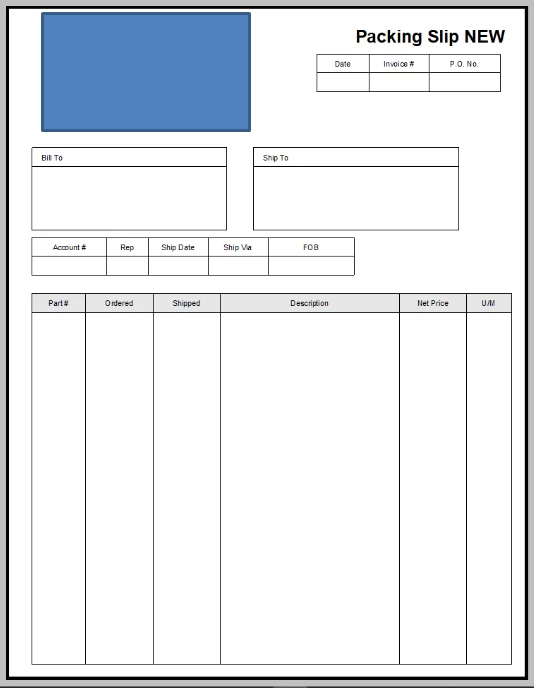
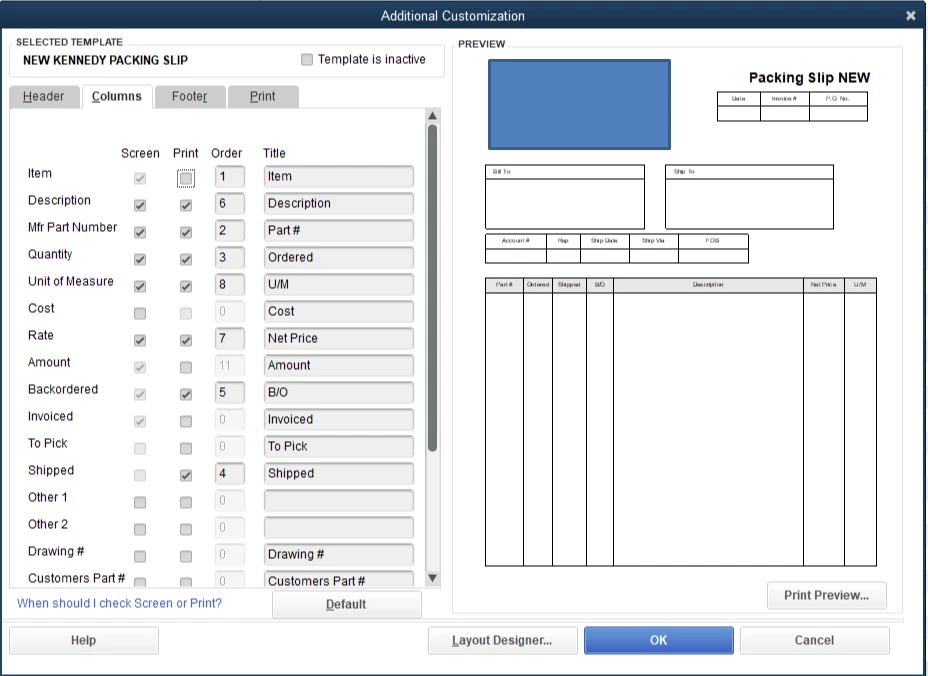
I have created a Sales Order form, but the design that is shown in layout designer and the thumbnail on the additional customization tab is not what shows in print preview (or what prints).  A column is missing and the column widths are different.  How do I get what is shown in layout designer to print?


13 replies

PreciousB
Level 6
March 20, 2019

Thanks for reaching out to us, ckennedy1.


I can help make sure that the Backordered column will show on the print preview screen.


First and foremost, thank you for sharing a screenshot of your sales order template. Knowing so will help us isolate the problem.


The Backordered column will only show on the print preview screen if you have partially invoiced the sales order.


The screenshots below will serve as your visual point of view.


Here's an article for the more details about customizing a template:  Use and customize form templates.


That should answer your question. If you have any questions or clarifications about QuickBooks, please leave a comment below. Have a good one.

ckennedy1Author
March 21, 2019


It doesn't work, even if I don't have sufficient inventory. It prints the full amount ordered in that column, nothing in shipped, and doesn't show the backordered number.  In this instance, there are only 23 available, but 25 were ordered.

Rustler
Level 15
March 21, 2019

@ckennedy1 


with the sales order up on screen, does the template choice (top right) say the same title as what you saved the template you showed?

ckennedy1Author
March 21, 2019

It does show the correct one.  What is truly confusing is that even when I open the blank template, it shows the correct version on the customization screen, but does not print correctly (or show correctly on print preview).

Rustler
Level 15
March 21, 2019

Some how I complete missed this


You are using a sales order template, a sales order is non posting, and as such there is no entry to the stock level.  Nothing is sold, ergo nothing can be on back order


If you make the same template, but start with the invoice packing slip the back order column should show up when needed since that template actually reduces inventory qty on hand

February 12, 2020

Did you end up figuring out why this happens? I’m having the same problem.

February 12, 2020

Hey there, @SylD.


You’ll want to customize your template as @Rose-A suggested and save them and you’ll be back in working order.


You may also check out this article about Using and Customizing Form Templates.


Let me know if there’s anything else I can help you with. Bye for now.

February 13, 2020

I have tried  all of these suggestions already. Unfortunately, it hasn't worked.


The Sales Order templates I have created were working perfectly fine for almost 2 years until the yesterday.  I selected a Sales Order Template which has a B/O column (from the drop down menu in the Sales Order window) and pressed the print preview or print button. The following happened:

- the template columns where completely different then the ones I had selected to print when I customized the form. (It looked like the Quickbooks standard stock Sales Order form columns with my headers).


Then, I went into Templates under lists to correct my custom Sales Order form. In the Layout designer, it looked like the form I was using to date but when I pressed the Print Preview button after saving it it changed back into that stock form. The Basic Customization preview pane and Layout designer window then would switch back and forth between these two form while never allowing me the Print Preview or Print my customized form.


I realized that the customized column number order in the Additional Customization window did not reflect what was printing. I then corrected everything in the Additional Customization and Layout Designer windows and pressed OK. Since then, when I Print or Print Preview the following happens:

- All the columns I customized both Print and Preview fine (including in the preview pane of the Basic Customize window) except the Backordered column (although it is selected). This also happens when you Print or Print Preview a Sales Order by selecting a Selecting a Sales Order template from the drop down menu in the Sales Order form when there are indeed Backordered items. 

- The columns shift around in width. This is especially true for the Description column that for some reason can no longer be made narrower than the stock width(?).

I thought perhaps the template file was damaged or corrupted so I created a new one from scratch and to my dismay the same happens.

I also restored old backups from way back when my templates worked fine and again this problem occurs.

I noticed that if I open and Print or Print Preview a Sales Order which was already saved with this template before I had this problem , the Backordered column will appear however the column widths are still out of wack. However, if I choose a different template, save, then choose that same template that had a Backordered column and Print or Print Preview, the Backordered column will now disappear!

 I tried calling Quickbooks for support and instead was sent a list of common template customization problems that was no help whatsoever!

I just noticed today,  when I made an invoice for a backordered item that the Sales Order does not appear in the Related Transactions pane under Transaction Tab to the right of the invoice. However, it appears in a Transactions History Report when I press on the little Related Transactions icon button. Not sure if this is related.