
SUMMER SAVINGS 90% OFF QuickBooks for 3 months* Ends 8/27

Buy now

Switch to QuickBooks and 70% off for 3 Months
Aug 5, 2025 1:23 PM UTC
Solved

How to Clear Paypal Deposit

Have a uncleared deposit in Paypal Balance account. 

In bank transactions, have a match with an invoice. 

How do I match the deposit with the bank transaction?


Irene RAnswer
QuickBooks Team
Aug 5, 2025 2:57 PM UTC

Hi there, Playawest45.


In QuickBooks Online (QBO), you don't need to match your PayPal deposit to your bank transaction if the bank transaction is associated with an invoice or deposit. You can exclude the deposit in your PayPal account to avoid duplicates and keep your sales numbers accurate.


If you see an invoice matched with your bank deposit, it means you've already recorded a payment for the invoice. Matching them will mark the invoice as paid.


Meanwhile, if you're matching the deposit with your bank transactions, ensure that they have the same information, such as the date and amount. To do so, you can follow the steps below:
 

  1. Log in to your QBO account.
  2. Go to Accounting, then select Bank Transactions.
  3. Click the tile of the bank account with the deposit.
  4. In the Categorize or Match column, click the button to Match.
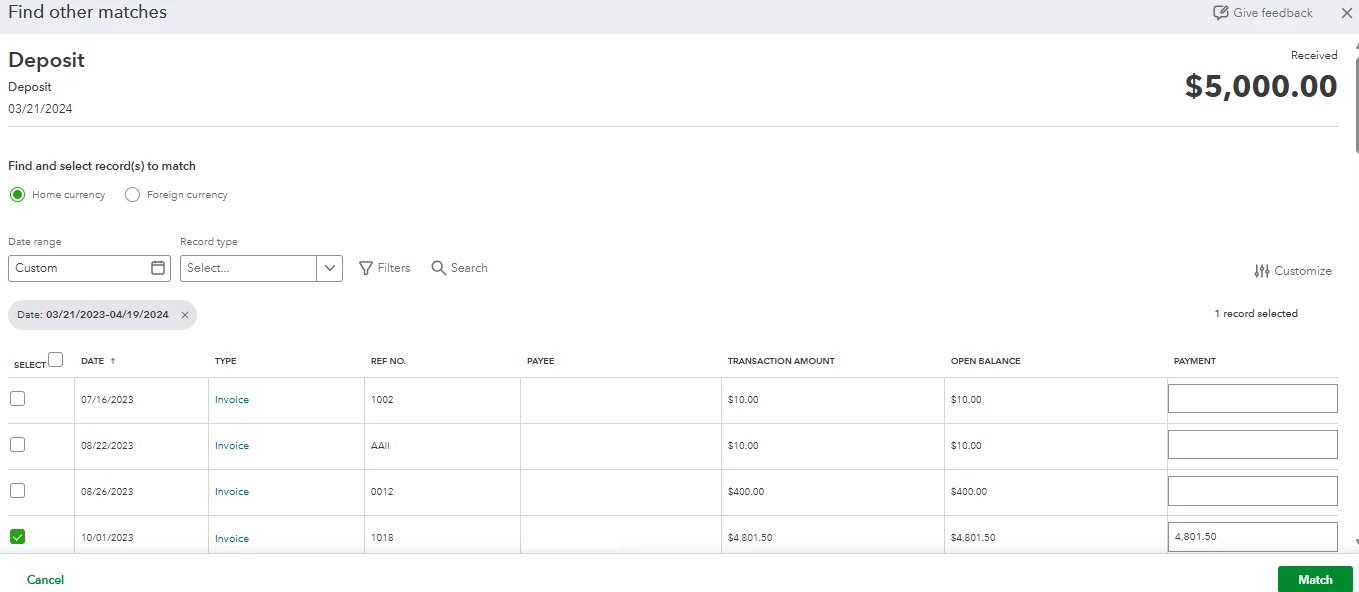
  5. Review the transactions from the Find other matches page. You can click it to get more info.
  6. Place a check mark on the selected transaction. After verifying, click Match.


Simplifying your financial records in QBO is easier with the support of our QuickBooks Live Assisted team. They can help enhance your expertise and optimize your business management processes.


The Community folks are here to assist if you have further questions about managing your QBO bank transactions and deposits.

1 reply

Irene RQuickBooks TeamAnswer
QuickBooks Team
Aug 5, 2025 2:57 PM UTC

Hi there, Playawest45.


In QuickBooks Online (QBO), you don't need to match your PayPal deposit to your bank transaction if the bank transaction is associated with an invoice or deposit. You can exclude the deposit in your PayPal account to avoid duplicates and keep your sales numbers accurate.


If you see an invoice matched with your bank deposit, it means you've already recorded a payment for the invoice. Matching them will mark the invoice as paid.


Meanwhile, if you're matching the deposit with your bank transactions, ensure that they have the same information, such as the date and amount. To do so, you can follow the steps below:


  1. Log in to your QBO account.
  2. Go to Accounting, then select Bank Transactions.
  3. Click the tile of the bank account with the deposit.
  4. In the Categorize or Match column, click the button to Match.
  5. Review the transactions from the Find other matches page. You can click it to get more info.
  6. Place a check mark on the selected transaction. After verifying, click Match.


Simplifying your financial records in QBO is easier with the support of our QuickBooks Live Assisted team. They can help enhance your expertise and optimize your business management processes.


The Community folks are here to assist if you have further questions about managing your QBO bank transactions and deposits.