
Get 50% OFF QuickBooks for 3 months*

Buy now
Switch to QuickBooks and 70% off for 3 Months
March 21, 2024
Question

American Express Connection

  • March 21, 2024
  • 1 reply
  • 3 views

QB Desktop for Mac 2024

Somehow I got two connections set up for American Express.  If I disconnect and try to reconnect, it tells me all of my accounts are already set up for online.  


I go to download the Amex transactions, and a connection window pops up:

If I close the window, there is a window in quickbooks that says I can review my connections, and if I click that, a window opens up:
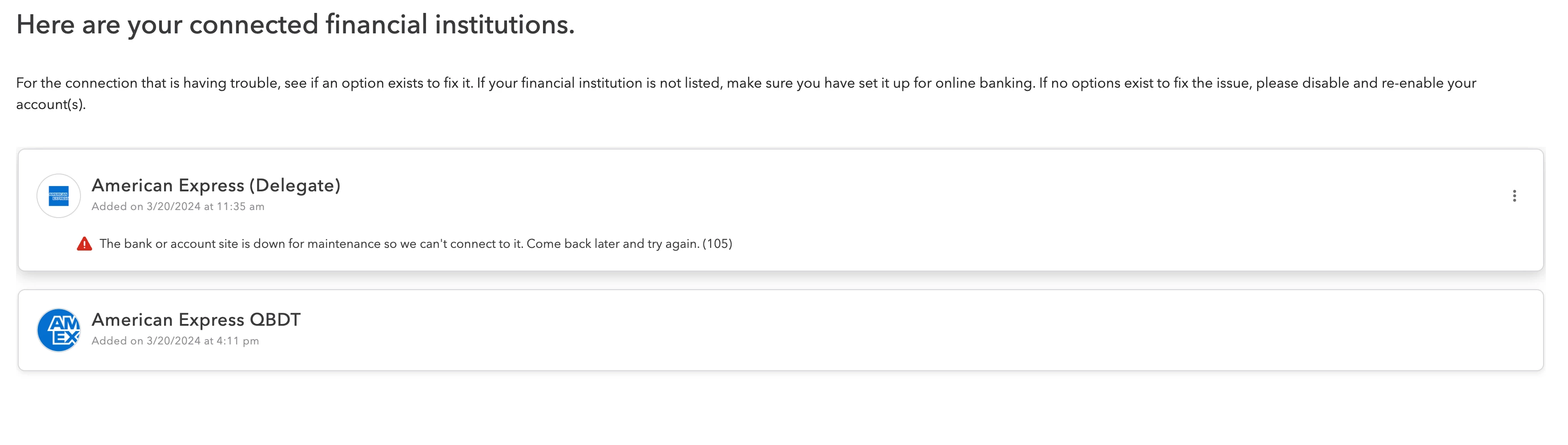
 

I don't know why the American Express (Deligate) is there, I use QBDT to connect.  Does anyone know how to get rid of it?  


TIA

1 reply

QuickBooks Team
March 21, 2024

Hello there, @AVIDPgh!


I'm sorry to hear that you face this kind of challenge when connecting your American Express to your QuickBooks Desktop (QBDT) for Mac. Please know that I'm here to help and provide you with some steps for your concern.


To fix the bank connection of your AMEX bank to QBDT Mac, make sure that your financial institution's list is up to date. Follow these steps below to manually update your bank:


  1. Go to File, then Close Company.
  2. Press both the Command button and the number 1 on your keyboard to display the Product Information window.
  3. Select the Logging tab, then select Delete FiDir.
  4. Close and reopen QuickBooks.
  5. Open your company file, then go the Banking, then Online Banking Setup to try and reconnect to your account.
  6.  

If the issue persists, kindly follow Solution 2 in this article: Fix online banking issues in QuickBooks Desktop for Mac.


Moreover, to disconnect your American Express Delegate bank in your QBFT Mac make sure you match or delete all of the downloaded transactions for the account. QuickBooks won’t let you make changes if there are still pending transactions. Here's how to disconnect your bank:


    1. Go to Lists, and then select Chart of Accounts.
    2. Highlight the account and select the pencil to edit.
    3. Select Online Settings.
    4. Select Download Transactions then select Not enabled.
    5. Select OK to confirm, then select OK.


If you encounter issues when deactivating your bank feeds, you can visit this article for detailed information and steps: Fix issues when deactivating bank feeds.


Additionally, I'm adding this helpful article as your reference in adding and matching your transaction in QBDT Mac: Add and match transactions in QuickBooks Desktop for Mac.


Return to this post if you have other concerns and clarifications in connecting and disconnecting your bank in QBDT Mac. The Community is always here to lend a hand.

AVIDPghAuthor
March 21, 2024

It never downloaded any transactions, it hasn't been able to connect for days.  I think I accidentally added the Delegate connection trying to fix it.  How do I remove just that connection?