
Get 50% OFF QuickBooks for 3 months*

Buy now
Switch to QuickBooks and 70% off for 3 Months
August 12, 2022
Question

Customer "Use with QuickBooks" checkbox

  • August 12, 2022
  • 1 reply
  • 13 views

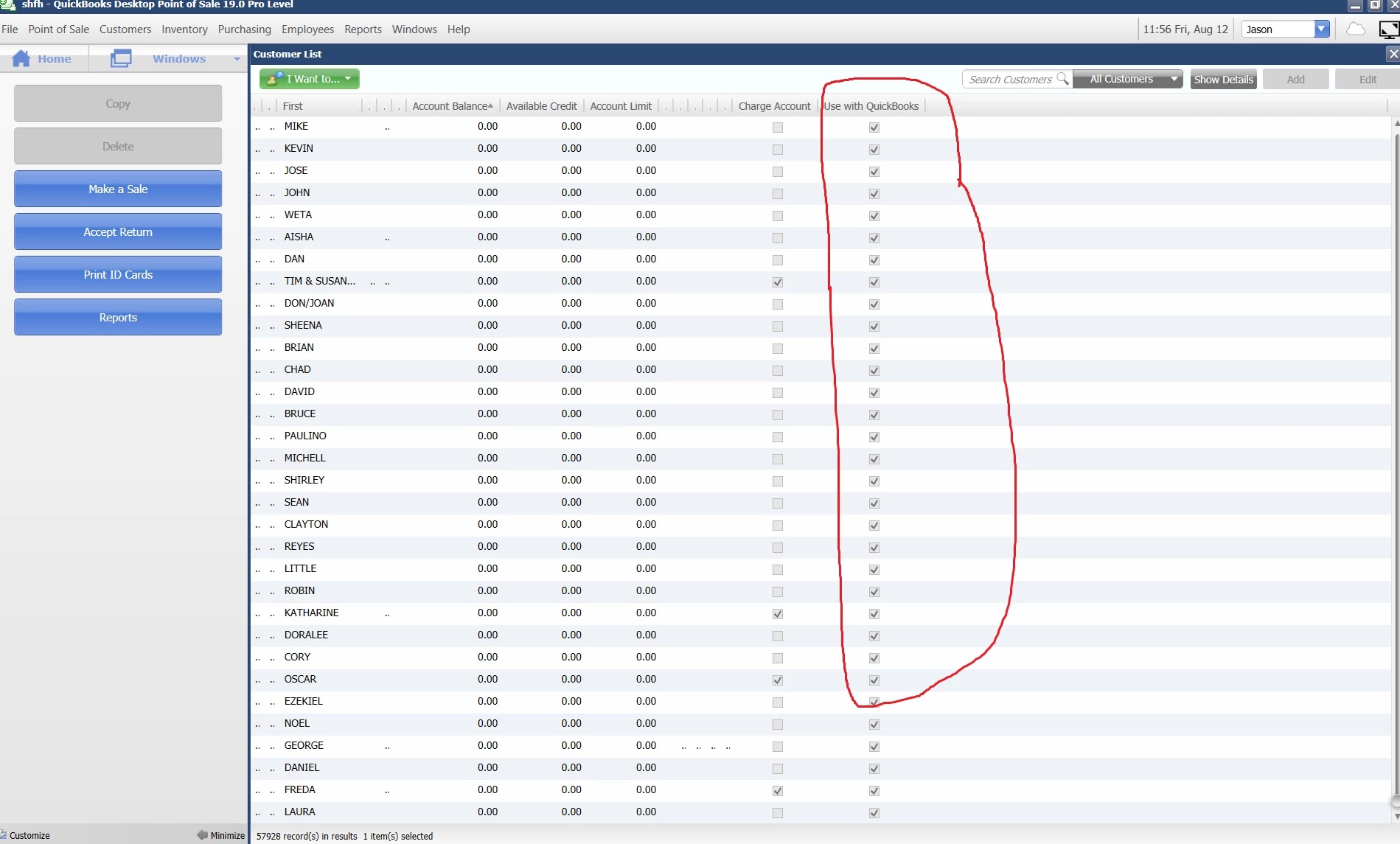
We just recently integrated our vs19 POS system with our 2021 QB financial software.  When we did this, the very first sync between the systems uploaded 11,000 of our 57,000 customers.  Doing some research, it looks like all of our customers had the "Use with QuickBooks" checkbox checked.  Does anyone know of a way to uncheck the customer boxes en mass?  The customer list will allow you to see all of the check boxes but not uncheck them all at the same time.  Also, under "Customers" in Company Preferences, the "Use with QuickBooks checkbox is checked to "No" for all newly entered customers.  This doesn't seem to help with the customers that have previously been entered.
1 reply

Rubielyn_J
Level 8
August 12, 2022

Let me provide some information about Use with QuickBooks checkbox, @SHFHSJason.


I recognize how relevant it is to have the option to uncheck customer boxes in batch to your business is. Currently, under the Company Preferences, you can select No undet Use with QuickBooks checkbox for all newly entered customers. For existing customers, you have to uncheck them manually.


At times, we roll out enhancements based on our customer's requests. That being said, I suggest sending a recommendation to our product developers. They'll review this idea and might consider updating it in the future.


Here's how:


  1. Open your QuickBooks Point of Sale file.
  2. Proceed to Help menu.
  3. Select Send Feedback.


I also encourage you to visit this resource that will guide you in tracking your daily point-of-sale business transactions like purchasing, receiving and selling merchandise as well as tracking inventory and customers: Financial Exchange Overview.


As always, add a comment below if you have any other questions about managing your customer lists in QuickBooks. I'm here to help always. Take care!

August 12, 2022

That's too bad that it needs to be done manually.  57,000 customers is going to be a lot of work one at a time.  What about removing the synced file from QB Desktop?  It imported 11,000 customers filling up our max of 14,500.  Can the synced file be removed or rolled back?  Other data was entered on the same day so rolling back to a previous file is not an option.


Thanks

QuickBooks Team
August 12, 2022

Thanks for getting back to us, SHFHSJason. 


I understand how you feel when things aren't working the way you wanted them to be working.


The option to roll back the synced file from QuickBooks Desktop isn't available. As mentioned by my peer above, you have to delete them manually. However, if you backed up before initiating a financial exchange, you can restore it since the customer is not synced.

I also added some links you can check. These will help you understand the process of integrating QuickBooks Point of Sale and QuickBooks Desktop:

Keep me posted if there's anything else you need about Financial Exchange. Just leave a comment below, and I'll get back to you.