
BLACK FRIDAY SALE 70% OFF QuickBooks for 3 months* Ends 11/29

Buy now
Switch to QuickBooks and 70% off for 3 Months
May 3, 2022 3:50 PM UTC
Question

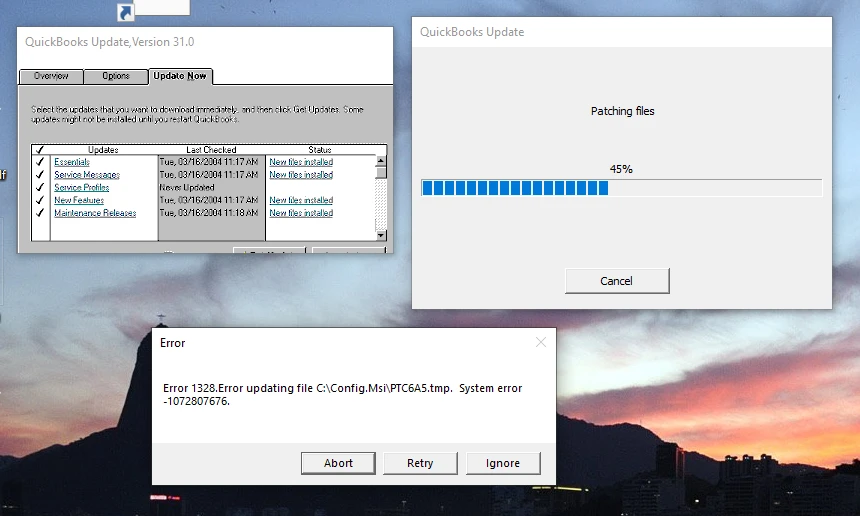
Error 1328 PTC6A5.tmp

I am receiving an error 1328 updating file C:\Config.Msi\PTC6A5.tmp. System error -1072807676

when trying to do an update on one PC in the business, not the PC that is hosting QB
1 reply

Moderator
May 3, 2022 5:40 PM UTC

Thanks for reaching out to us, ultmgr1502.


I'll share some steps to fix the error 1328.


Several reasons are causing this error. Some of them are as follows:


  • There can be some download issues with QuickBooks software
  • The program files are either damaged or corrupted.
  • Issues with the network and connectivity.
  • Your computer might be having some issues.
  • The QuickBooks Desktop isn't properly installed.
  • Invalid entries in the Windows operating system.
  • Your computer could be under attack by some malware or viruses.


Let's go through some troubleshooting procedures to figure out what's causing this issue. QuickBooks can't function without Windows components such as MSXML, Microsoft .Net, and C++. Let's ensure there are no pending Windows updates.


Here's how:


  1. Click the Start menu, then search for windows updates.
  2. After that, select the Windows Update icon.
  3. Choose the check for updates.
  4. Once done, restart your computer.


Then, you run the repair QuickBooks Desktop application. I'll show you how.


  1. Restart your computer.
  2. Open the Windows Start menu, then click Control Panel.
  3. Select Programs and Features, then Uninstall a Program.
  4. Choose QuickBooks from the list of programs, then click Uninstall/Change.
  5. Select Continue, or Next.
  6. Click Repair, then Next.
  7. Once done, hit Finish.


If the issue persists, you can reinstall QuickBooks using a clean install. Please see this article for a complete guide: Clean install QuickBooks Desktop.


In addition, I've added this resource if you need help restoring your company file: Restore your file.


Please let us know if you need further assistance fixing the error 1328. I'll be around to help you again.
