Hello, obonnaius.
You'll first have to unmatch the partially matched transaction in the Categorized tab so you can exclude it from your bank register. Let's go to the Banking menu to achieve this task in QuickBooks.
- Go to Bookkeeping, select Transactions, and then select Bank transactions or go to the Banking menu.
- Select the tile for the account you want to review.
- Go to the Categorized tab.
- Find the transaction to unmatch and click Undo under the Action column.
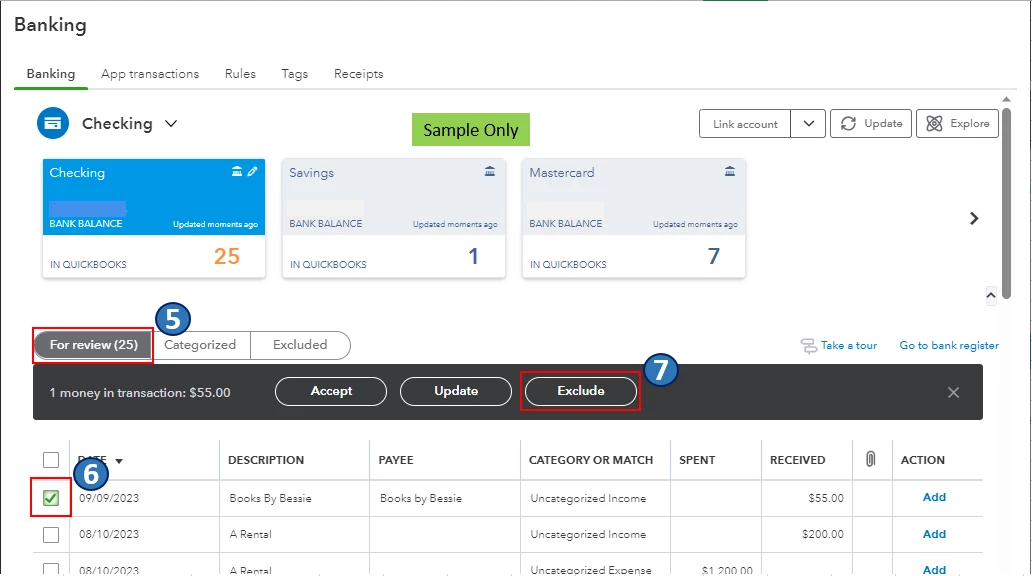
- Go to the For review tab.
- Click the checkbox of the transaction to exclude.
- Select Exclude.
To learn more about excluding transactions in QuickBooks Online (QBO), please see this article: Exclude a bank transaction you downloaded into QuickBooks Online.
Also, I encourage you to reconcile your accounts in QBO regularly (every month). This helps monitor your income and expense transactions and detect possible errors accordingly. You may want to check out this article as your reference to guide you in doing and fixing reconciliations in QBO: Learn the reconcile workflow in QuickBooks.
I'm all ears if you have other banking concerns or questions about managing transactions in QBO. You can drop a comment below, and I'll gladly help.
