
SUMMER SAVINGS 90% OFF QuickBooks for 3 months* Ends 8/27

Buy now
Switch to QuickBooks and 70% off for 3 Months
August 19, 2021
Solved

Saving Payroll info for employees

Thank you in advance for your support you are appreciated.  

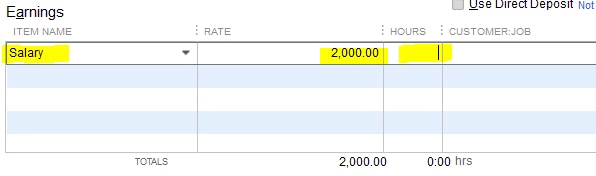
I would like to know how to save the information in the highlighted fields from paycheck to paycheck? 


AlexV
AlexVAnswer
Level 10
August 19, 2021

Hi rcwurts!


I know how to save the payroll item and rate. Let me show you the steps.


Visit the employee's profile and edit it. From there, we can add the earnings and rate. Here's how:

  1. Go to the Employees and select Employee Center.
  2. Click the employee's name and proceed to the Payroll Info tab.
  3. Add the Salary payroll item and the rate in the Earnings tab.
  4. Tap OK to save it.


You'll need to manually calculate the worked hours and enter them in the Hours field when running payroll.


For new subscribers of QuickBooks Desktop Payroll, I suggest you check this article: Get started with Payroll. This will show you the steps on how to set up the company file for payroll, how to run payroll, and pay and file federal and state taxes.


I'll be here if you need more help. Take care!

3 replies

AlexV
AlexVAnswer
Level 10
August 19, 2021

Hi rcwurts!


I know how to save the payroll item and rate. Let me show you the steps.


Visit the employee's profile and edit it. From there, we can add the earnings and rate. Here's how:

  1. Go to the Employees and select Employee Center.
  2. Click the employee's name and proceed to the Payroll Info tab.
  3. Add the Salary payroll item and the rate in the Earnings tab.
  4. Tap OK to save it.


You'll need to manually calculate the worked hours and enter them in the Hours field when running payroll.


For new subscribers of QuickBooks Desktop Payroll, I suggest you check this article: Get started with Payroll. This will show you the steps on how to set up the company file for payroll, how to run payroll, and pay and file federal and state taxes.


I'll be here if you need more help. Take care!

rcwurtsAuthor
August 19, 2021

Many thanks you's Alex

Level 8
August 19, 2021

Hey there, @rcwurts. 


You're welcome!


I'm so glad that my colleague could help you save the information you requested in your QuickBooks Desktop account. 


If you have any other questions or concerns, just let us know. The Community will be more than happy to help in any way we can. Have a splendid Friday Eve and weekend ahead!

