
Get 50% OFF QuickBooks for 3 months*

Buy now
Switch to QuickBooks and 70% off for 3 Months
January 11, 2023
Question

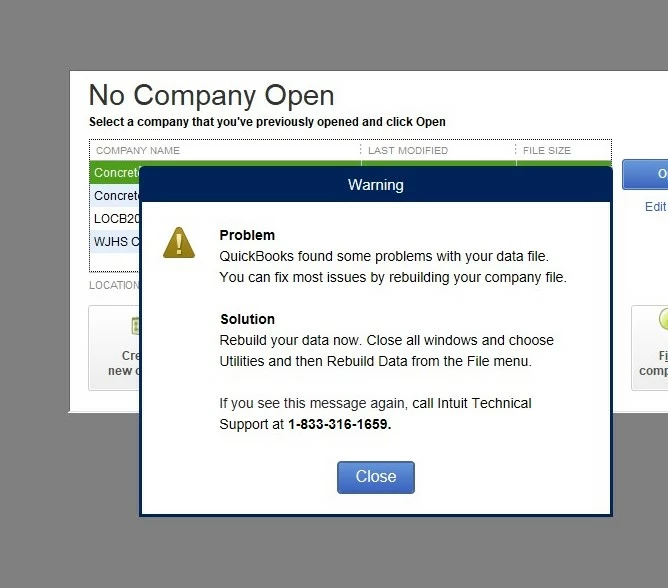
Warning Message

  • January 11, 2023
  • 1 reply
  • 0 views

Has anyone else encountered this message?  I have rebuilt the data file several times but it makes no difference - this warning keeps popping up and blocking me from doing much else.
1 reply

Fiat Lux - ASIA
Level 14
January 12, 2023

It is a scam message. When you call the number, they will ask you to pay a fee to fix it. Chat Intuit Support and ask them to remove malicious files from your machine. Otherwise, send me a private message to help.

QuickBooks Team
January 12, 2023

Good to see you here in the Community, @HONDO33.


I'd be glad to help you fix the error message you're getting in the program. 


Let's run QuickBooks Tool Hub to fix the error. It contains a set of tools to address different types of problems in your company file.


Here's how:


  1. Close QuickBooks.
  2. Download the most recent version (1.6.0.0) of QuickBooks Tool Hub. Then, keep the file somewhere you can easily find it. The version will display on the bottom right.
  3. Open the file you downloaded (QuickBooksToolHub.exe).
  4. Follow the on-screen steps to install and agree to the terms and conditions.
  5. When the installation finishes, click the icon on your Windows desktop to open the tool hub.


After that, follow step 2 in this article to use its tools: Fix common problems and errors with the QuickBooks Desktop Tool Hub.


Also, update QuickBooks Desktop to the latest release as it becomes available to ensure you have all the updated components.


Once fixed, you can start working on your QuickBooks program. If you need help, you can always visit our articles from the general articles list page.


Please let me know the results of the troubleshooting steps. I'm always here if you need further help. Have a good one.
