
Get 50% OFF QuickBooks for 3 months*

Buy now
Switch to QuickBooks and 70% off for 3 Months
New Member
July 6, 2026
Question

How do I remove review invoice pop-ups?

  • July 6, 2026
  • 2 replies
  • 7 views

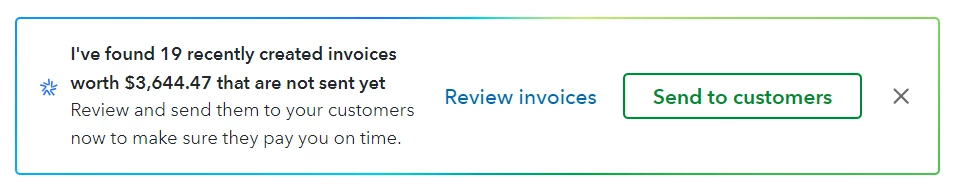
Hi - please could someone help.  The AI feature that asks to review invoices is driving us crazy (see below.)  If you accidentally hit “Send to customers” instead of on the X, there is no chance to correct this.  We create invoices as we deal with customers, and there are often many changes made before proofs are accepted and invoices are paid.  WE DO NOT WANT THESE SENT TO OUR CUSTOMERS UNTIL WE ARE READY, and the positioning of this pop-up has repeatedly been actioned when trying to hit the X!  Is there any way to permanently disable this message.  It is more of a hinderance than a help.  We don’t want unhelpful suggestions by AI and would to control this feature, please!  Thank you!
 

2 replies

Moderator
July 6, 2026

Thank you for connecting with our QuickBooks Community, EJQB5! At this moment, there is no toggle feature to permanently disable the AI review and send pop-up in QuickBooks Online. However, I do understand your frustration! What we can do though, is submit a feature request to our Developers to allow this change in future updates. I encourage you to join me as well in sending this request. Here’s how:
 

  1. Log in to your QuickBooks Online account.
  2. Click the Gear icon (Settings) in the top-right toolbar.
  3. Select Feedback under the Profile column.
  4. Add the necessary information and click Send.

Please let me know if you have any other questions or concerns. My team and I will do our best to help. Thank you. 

EJQB5Author
New Member
July 6, 2026

Thank you - I just did.  Unfortunately it sometimes pops up while one is working and it gets clicked without intending to.  It would even be helpful if there was an “Are you sure?” option before actually going through with it.  It is super frustrating to have to explain to customers to just ignore the reminder as we are still working through details.  PLEASE FIX THIS UNNECESSARY FEATURE QUICKBOOKS!