
BLACK FRIDAY SALE 70% OFF QuickBooks for 3 months* Ends 11/29

Buy now
Switch to QuickBooks and 70% off for 3 Months
Sep 3, 2025 4:51 PM UTC
Solved

One Invoice Two Payments?

Hi all....up front, please know I am not a bookkeeper.  Just an old lady doing it myself so when you reply, please dumb it down....


Question...I do my invoicing thru QB and for each client I have been sending two invoices.  First, when they call and make a booking I assess a $250 deposit.  The second invoice is due upon drop-off of their dog or puppy.  I send the second invoice a day or two before drop-off.


I had a question last week and spoke with one of the Live Experts and was told I should only be sending one iinvoice.  (I am attaching one of my invoices below).  How do I send only one invoice but receive a deposit at booking and then one at drop-off.  If I send the invoice itemized then they pay the full thing.  


The expert told me how to do it but she lost me somewhere along the way.  Is there anyone out there who gets two or more payments but only send one invoice?


I would appreciate any help you can provide.  Please know that I am NOT a bookkeeper/accountant..Just an only lady running a business and doing it all myself, so please "dumb down" your responses so I can follow along.


Many, many thanks!!  ~Cindy
MichaelaSAnswer
Moderator
Sep 3, 2025 8:58 PM UTC

Kudos to you for doing a great job managing everything yourself, LTYD.


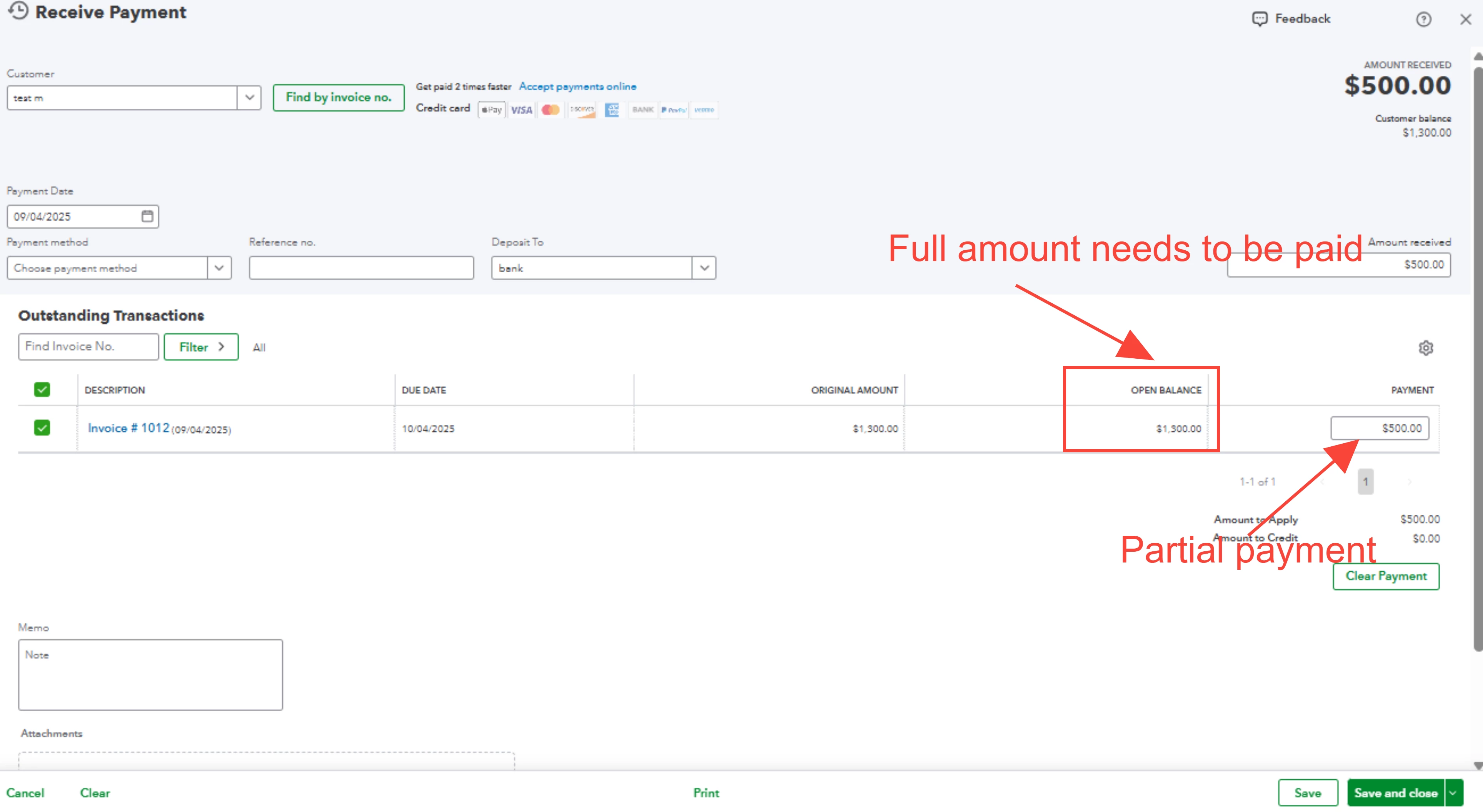
The best way to send one invoice that allows your customer to make two payments is through a partial payment. A partial payment lets your customer pay part of the invoice now and the rest later.

Please create one invoice with the total amount all the items, then apply the partial or deposit, and then the remaining balance until the payment is complete.


To Record Partial Payments:


  1. Go to + Create, select Receive Payment, and choose the customer.
  2. Mark the correct invoice, and in the Payment column, enter the partial amount.
  3. Click Save and send.


Please see the sample screenshot:


Then, repeat the same process when your customer pays the remaining amount. Y
ou may also check this article for more details:
Record invoice payments in QuickBooks Online.


You can also check your invoices, estimates, sales receipts, and their statuses by going to All Apps, then selecting Sales & Get Paid, and clicking on Sales Transactions.


Please leave us a response if you have other questions or concerns.

2 replies

MichaelaSModeratorAnswer
Moderator
Sep 3, 2025 8:58 PM UTC

Kudos to you for doing a great job managing everything yourself, LTYD.


The best way to send one invoice that allows your customer to make two payments is through a partial payment. A partial payment lets your customer pay part of the invoice now and the rest later.

Please create one invoice with the total amount all the items, then apply the partial or deposit, and then the remaining balance until the payment is complete.


To Record Partial Payments:


  1. Go to + Create, select Receive Payment, and choose the customer.
  2. Mark the correct invoice, and in the Payment column, enter the partial amount.
  3. Click Save and send.


Please see the sample screenshot:


Then, repeat the same process when your customer pays the remaining amount. Y
ou may also check this article for more details:
Record invoice payments in QuickBooks Online.


You can also check your invoices, estimates, sales receipts, and their statuses by going to All Apps, then selecting Sales & Get Paid, and clicking on Sales Transactions.


Please leave us a response if you have other questions or concerns.

LTYDAuthor
Sep 3, 2025 10:08 PM UTC

Holy cow, Michael!  Thank you so very much!  I've looked and looked and couldn't find the answer.  This is perfect!

