
Get 50% OFF QuickBooks for 3 months*

Buy now
Switch to QuickBooks and 70% off for 3 Months
August 23, 2025
Solved

Problems displaying reports

  • August 23, 2025
  • 1 reply
  • 1 view

I am a user in QuickBooks, I want to see all the reports but I can not show a message
We couldn’t display your data, but you can access it by exporting it to Excel. Export

Please what is the solution, thank you for your help

Best answer by Heide DC

Thank you for reaching out to the Community, Barzan.


To better assist you, could you please let us know what report you're trying to run? If possible, please provide another clear and accessible screenshot, as this will help us accurately diagnose the issue and provide the best solution.


QuickBooks encounters the message, We couldn’t display your data, but you can access it by exporting it to Excel, when attempting to show reports that contain a large amount of data. This often happens with reports like Profit & Loss or General Ledger reports with thousands of transactions. In such cases, the program might time out before fully loading the data on-screen.


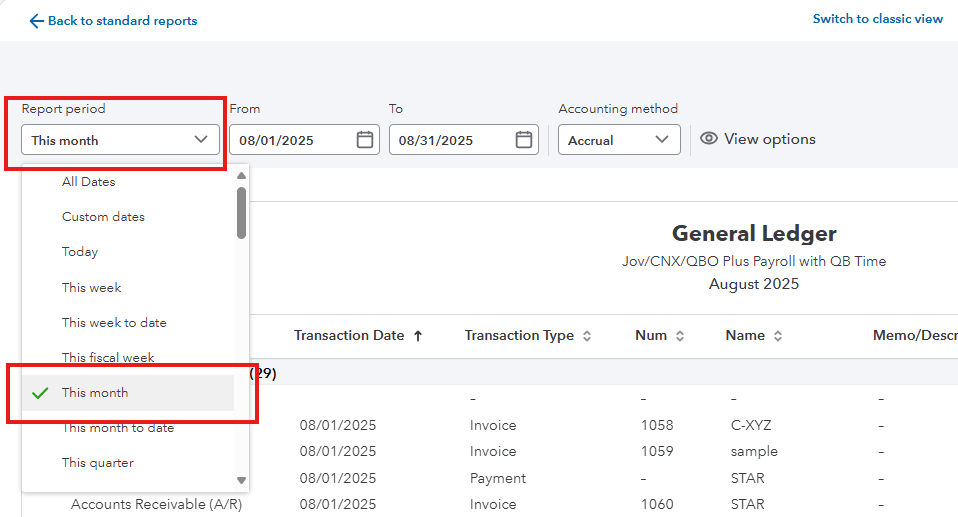
Alternatively, you can try running the specific report for a shorter date range or reducing the number of columns included. For example, instead of generating a year-to-date report, you might run it month-by-month to reduce the data size.


If viewing the report inside QuickBooks continues to persist, you can use the Export option. Exporting the report to Excel allows you to access the full data set outside of QuickBooks, where Excel can handle large datasets.


Let us know the report you’re working with and share the screenshot, so we can provide more tailored steps.

1 reply

Heide DCAnswer
August 23, 2025

Thank you for reaching out to the Community, Barzan.


To better assist you, could you please let us know what report you're trying to run? If possible, please provide another clear and accessible screenshot, as this will help us accurately diagnose the issue and provide the best solution.


QuickBooks encounters the message, We couldn’t display your data, but you can access it by exporting it to Excel, when attempting to show reports that contain a large amount of data. This often happens with reports like Profit & Loss or General Ledger reports with thousands of transactions. In such cases, the program might time out before fully loading the data on-screen.


Alternatively, you can try running the specific report for a shorter date range or reducing the number of columns included. For example, instead of generating a year-to-date report, you might run it month-by-month to reduce the data size.


If viewing the report inside QuickBooks continues to persist, you can use the Export option. Exporting the report to Excel allows you to access the full data set outside of QuickBooks, where Excel can handle large datasets.


Let us know the report you’re working with and share the screenshot, so we can provide more tailored steps.

August 23, 2025

Thank you, the problem was solved


Moderator
August 23, 2025

You're welcome, Barzan.


We're delighted to hear that our colleague was able to help you regarding the issue with your report. Please know that it's our utmost priority to assist you with QuickBooks-related concerns.
 

If you have more queries, feel free to revisit the Community forum.
