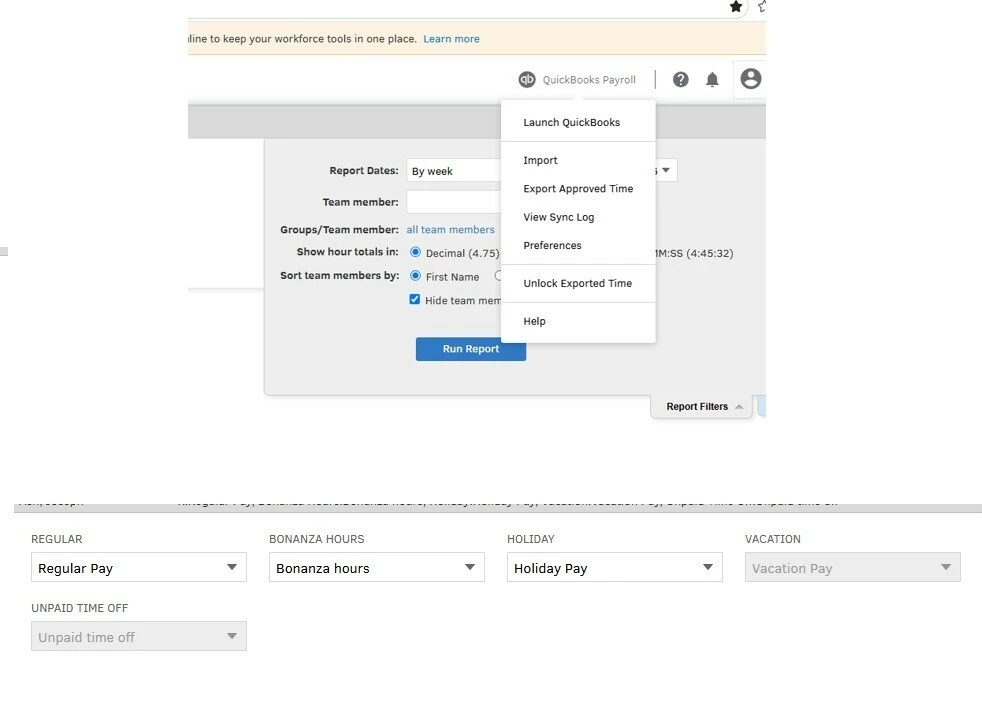
FYI: hours will look correct in TIME but when I export the hours to payroll Bonanza will show up as regular hours. To Fix this I have to go to quickbook classic time>left click Quickbook times Payroll icon.> Preferences > Payroll Item Mapping Tool> and make sure that each pay type is mapped to its respective name.
So why is vacation grayed out in the payroll mapping item tool? so far it doestnt seem to be causing a problem but it the grey is not consistent with the rest of the tool
I’m glad to hear that the hours are now exporting correctly. Vacation and unpaid time off are grayed out because they map automatically to the time-off policies you set up and assigned in QuickBooks Online Payroll. This also applies to paid time off and sick pay.
On the other hand, regular, holiday, custom pay types, and other time-off policies are flexible earnings categories. QuickBooks Time allows you to assign different payroll items to them based on how you track work hours.
If you have any other questions, feel free to let us know. We're here to help.
I do not understand. I am pretty sure all our employees have vacation pay type added pr assigned to the employee on the payroll and workforce side.
All our employees have successfully been paid payroll and they are all greyed out in the mapping tool. They can all choose vacation from their workforce app.
Need QuickBooks guidance?
Log in to access expert advice and community support instantly.