
SUMMER SAVINGS 90% OFF QuickBooks for 3 months* Ends 8/27

Buy now
Switch to QuickBooks and 70% off for 3 Months
New Member
September 16, 2026
Question

Invoicing has stopped working

  • September 16, 2026
  • 5 replies
  • 54 views

Invoicing has stopped working. I go to sales and get paid, sales transactions, select unbilled. There is no longer a “Convert to Invoice” option on the right side, and on the “Batch Actions” button, everything is grayed out if, even if I select just one invoice.
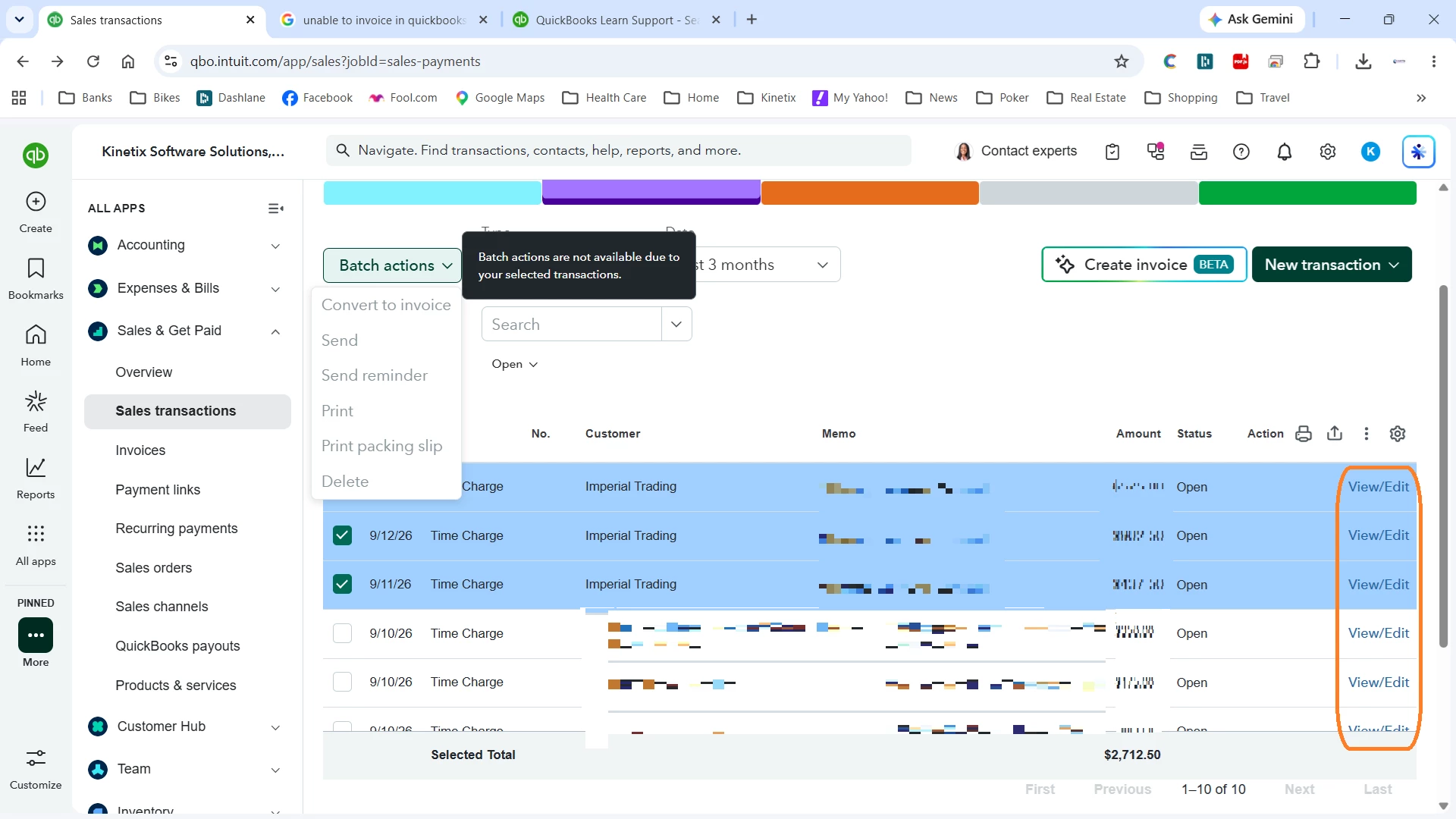
 

I’ve tried incognito mode, tried a different computer, and downloaded the desktop app. All are having the same problem. Please help asap, I’d like to get paid...

5 replies

Moderator
September 16, 2026

Thank you for reaching out to the QuickBooks Community, kinetix-world. I would love to help. I appreciate you for sharing that screenshot. 


Based on the screenshot you shared, it seems like you are trying to batch-convert entries listed as a "Time Charge" rather than a standard delayed charge, estimate, or unbilled product/service.


The caption "Batch actions are not available due to your selected transactions."  with this, QuickBooks Online enforces this restriction because Time Charges (billable time entries) cannot be batch-converted directly into invoices from this general Sales Transactions menu screen. They must be compiled into invoices through a different workflow which I will share below. 


Instead of starting from your transaction list, create the invoice first and pull the unbilled time into it: 

  1. Click the + New button in the top left corner of your screen.
  2. Under the Customers column, select Invoice.
  3. Choose Imperial Trading from the customer drop-down menu.
  4. A Suggested Transactions drawer will automatically slide open on the right side of your screen, displaying all of those unbilled 9/12/26 and 9/11/26 Time Charges.
  5. Click Add or Add all to instantly pull them onto the invoice, then click save.


Here’s another method to try:

  1. Look at your left-hand navigation sidebar and click on Customer Hub (or Sales > Customers).
  2. Find and click on Imperial Trading.
  3. Scroll down to their account ledger activity. Under their open, unbilled time activity section, you will see individual action links next to each charge to generate an invoice.


QuickBooks Online recently updated its data table behaviors. Because a Time Charge relies on specific employee hourly rates, item mappings, and billable tags, the system locks out general list-view batch actions to prevent formatting errors. Using either of the two workflows above will bypass this menu restriction completely and let you bill your client immediately. 


Let me know if you experience any other issues, my team and I will be here to assist further. See you soon and looking forward to that update! 

New Member
September 17, 2026

I apologize for adding my comments to someone else’s post, but I am experiencing the exact same issue and wanted to add my feedback because this change has had a significant impact on my monthly billing workflow.

I have been using the Batch Actions → Convert to Invoice workflow for unbilled time every month, and this change has made the billing process significantly more cumbersome.

Previously, I could review all unbilled time charges in one place, select the applicable entries, and convert them directly to an invoice. That was a very efficient and practical workflow, especially when handling multiple clients and projects.

In fact, I would have expected QuickBooks to improve this feature further by allowing users to select all unbilled time entries at once and automatically create separate invoices for each customer/project. That would be a meaningful improvement for anyone processing monthly billing across many projects.

Instead, the opposite happened. Not only was that broader batch capability never added, but the existing Convert to Invoice option was removed as well.

Now users have to identify which customers have unbilled time, create an invoice for each customer/project individually, open Suggested Transactions, and manually add the applicable entries one project at a time. This adds unnecessary steps, takes considerably more time, and increases the chance that unbilled time will be overlooked.

This was not a minor convenience. It was an important and efficient part of the monthly billing workflow.

Please restore the ability to select unbilled time charges and use Batch Actions → Convert to Invoice. Ideally, QuickBooks should go further and allow all selected unbilled entries to be converted in one action, with a separate invoice automatically created for each customer/project.

I would appreciate it if this feedback could be escalated to the product team.

New Member
September 17, 2026

Thank’s for the reply. At least now I have a way to create my invoices.

New Member
September 16, 2026

None of your suggestions work. I did get a call from Gabriel. He got on my computer and did some research and told me there was a error in my data. He gave me 3 options to get support to fix it. He wanted $1499 as the least expensive option. Is this a scan. I can’t imagine that I would have to pay for my support from you if I am subscribed and paying you for Quickbooks online advanced and you can’t fix my data.