Get 50% OFF QuickBooks for 3 months*

Buy now
Switch to QuickBooks and 70% off for 3 Months
August 30, 2021
Solved

BBL Repayment

  • August 30, 2021
  • 1 reply
  • 3 views

Hi,

So I have a liability account, that has a Bounce Back Loan in it. 

Lets say for £10,000. 

It's Negative £10,000. That's correct. Fine. 

So I sync my bank transactions and apply the payment to that account. That's fine. 

But  my interest has started coming off as well, it comes off the Bounce Bank Loan account and adds onto the balance. 

How do I reflect these interest payments in the BBL account and apply them to a expense P&L? 


Best answer by JasroV

Thanks for your prompt reply, @email4.


I'll share some other ways to reflect those interest payments as expenses in your BBL account. 


You'll want to manually add an expense transaction to your BBL account to show the interest payments as an expense. I'll show you how.


  1. Go to the Accounting menu in your QuickBooks Online (QBO) account.
  2. Select Chart of accounts.
  3. Locate and double-click your BBL account to open it.
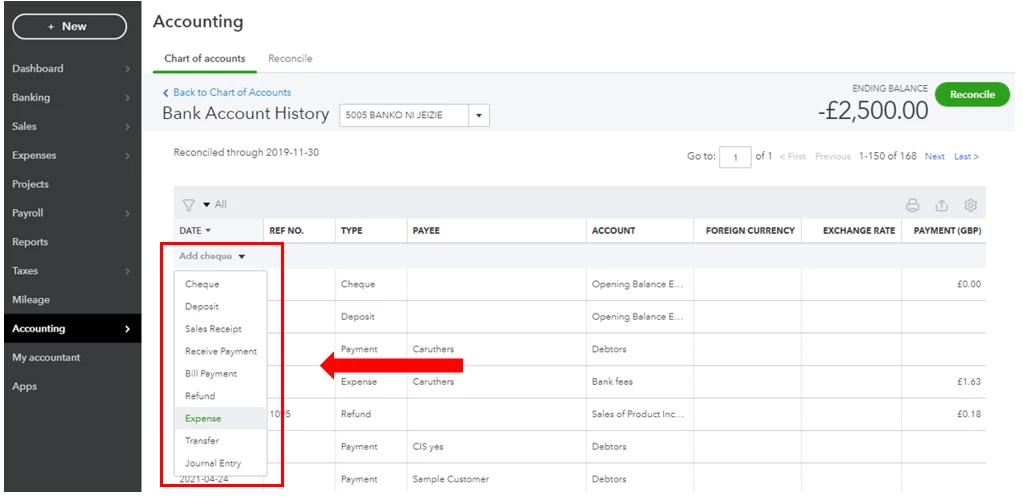
  4. From the top of the list, select the Add cheque or Add Expense drop-down and select Expense
  5. Fill out the fields to complete the transaction, then click Save.


You can also check this link for more details about the process: Manually add transactions to accounts in QuickBooks Online.


Moreover, I still encourage you to check with your accountant or visit our ProAdvisor page to look for one from there. This way, you'll be guided accordingly in recording this. They can also provide you on other ways to record this.


Once you're all set, feel free to check out this article for reference. This can walk you through the process of flawlessly matching your book and bank accounts: Reconcile an account in QuickBooks Online.


I'll be here if you have any additional questions about recording your expenses in QBO. Keep safe!

1 reply

Moderator
August 31, 2021

I'll share insight on your query about a bounce-back loan repayment along with its interest, @email4.


You can create a cheque or an expense transaction to record the payment for this type of loan. To include interest payments, add them as another line item. Assign a specific expense account for these interest payments so you can have them show up in the Profit and Loss report. 


Please be advised that it's best to consult an accountant for this matter. They can guide you with what accounts to use, so you can keep your books accurate. 


Let me know in the comments below if you have other questions about bounce-back loans in QuickBooks Online. I'll be around to help you out. Have a pleasant day!

email4Author
August 31, 2021

This does not help. 

I need to add this into the BBL account and show it as an expense 

December 1, 2022

Thanks for joining this conversation, JamesCParsons.


Allow me to jump in and help ensure you can record the interest as an expense in your QuickBooks Online (QBO).


You should be able to choose Expenses when clicking the drop-down option, as shown by my colleagues above. To isolate this, let's sign in to your QBO using a private browser (incognito). There are times that the browser is already full of frequently accessed page resources (cache and cookies), causing some unusual responses.


Here's how:


  • Press Ctrl Shift (Google Chrome).
  • Ctrl Shift (Firefox).
  • Control Option (Safari).


Once logged in, go back to your account register to double-check. You can follow the detailed steps shared by my colleagues above for further guidance.


If it works, return to your default browser and perform a clear cache to refresh the system. However, if the issue persists, try using other supported browsers.


To know more about managing and adding transactions to your account in QBO, consider checking out this article: Manually add transactions to accounts in QuickBooks Online.


Once everything looks good, you can proceed with reconciling your account to ensure your books are accurate: Reconcile an account in QuickBooks Online.


I also recommend visiting our website for more tips and other resources you can use in the future: Self-help articles.


Please post again or leave a comment in this thread if you have more questions about this or anything else QuickBooks. I'll be here to assist. Stay safe.


Hi,

As I stated in my original comment, I do not get an expense option when clicking that drop down. what I get is the option between 'transfer' or 'journal', as per the picture attached.

How do I get the expense option?

Thank you