
Get 50% OFF QuickBooks for 3 months*

Buy now
Switch to QuickBooks and 70% off for 3 Months
January 30, 2021
Solved

Recurring transaction dates not changing

  • January 30, 2021
  • 2 replies
  • 2 views

Hi, I have 3 recurring invoices set up on the system to remind me monthly on the last day of each month. However, when I click to use them and then save the new invoice, the date of the next recurring transaction hasnt moved on a month which I thought it would- am I doing something wrong? Thanks!

Best answer by MJoy_D

Thank you - I did actually use the "use" drop down when I recorded the invoice so that is odd?


You're welcome, @lkoups


I can provide additional information about using a recurring transaction. 


Using or utilizing the Use feature when recording the invoice is totally fine. 


When you create the invoice by using that feature, the invoice will still use the scheduled date. You’ll need to reset or edit the date to stop the transaction from sending on the scheduled date. 


This means that when you manually create or use that template, that won’t update or move the date to the next schedule. 


You'll need to edit it so it'll no longer be sent automatically on the scheduled date. Here's how:


  1. From the Recurring Transaction List, click the Edit button of the template that you're referring to. 
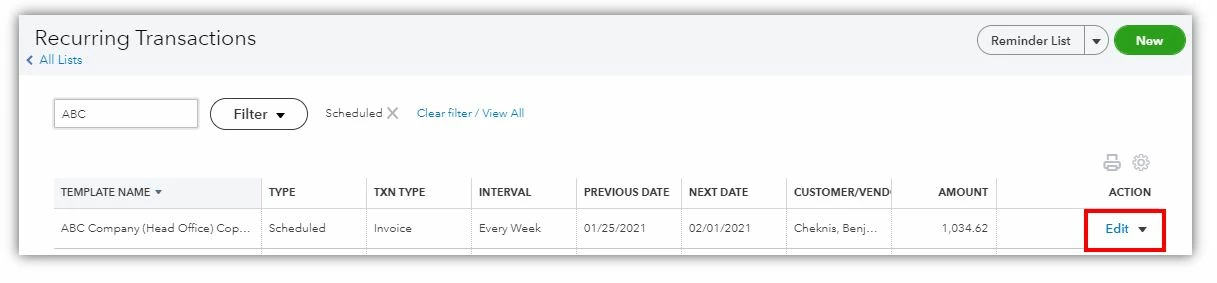
  2. Update the Start and End date.
  3. Select Save template.


You can check this article for more information on how to schedule recurring transactions created with a template and on how to edit a recurring template


I'm always here if you still have questions about your recurring invoices. Let me know in the reply section below. Take care and have a wonderful day!

2 replies

Adrian_A
Level 8
January 30, 2021

It isn't the kind of experience that we want you to have, lkoups.


Let's perform some steps to isolate the issue. To start with, let's try opening QuickBooks on an incognito window. This mode doesn't use the existing cache data and helps us confirm browser-related issues. Here's how:

  • For Google Chrome browser: Ctrl + Shift + N
  • For Mozilla Firefox browser: Ctrl + Shift + P
  • For Safari browser: Command + Option + P


If it works, go back to your regular browser and clear the cache to delete those temporarily stored files and browsing history. The overtime collection of data can create corruption, however, removing this should fix the issue.


You can also use other supported, up-to-date browsers to roll out the possibility of a browser-related issue.


Let me know how these troubleshooting steps work on your end. Keep safe!

lkoupsAuthor
January 30, 2021

Thank you for your message. I’m not sure why I need to export into XL as this is not the problem I’m having them so I’m a bit confused as to why I need to do that. Hopefully I’m not missing anything from your advice.

March 12, 2021

Real shame this doesn't work automatically. We "use" but then have to "skip the date" afterwards to move it on to the next month. Going to forget loads and end up missing transactions. Real shame this doesn't work as desktop does. 


I was pretty disappointed when first going to QBO that reminders didn't work the same. But  month or 2 in, I have moved most of my reminders to scheduled transactions. That meets most needs. But there are still transactions that I leave out there as reminders for one reason or another, and yes, unless I have the discipline to remind myself to check reminders, I overlook them and miss dates. So nothing critical gets posted as a reminder, always as scheduled.

July 11, 2023

I have multiple journal entries and payables set up as recurring transactions.  We are not using a "scheduled" under the type, we are using reminder.  When we choose "use" it is not advancing to the next month as these are all set up as either the first of the month or last of the month.  Do we have to edit the date on the template each time?  Thank you in advance.  

Level 8
July 11, 2023

I appreciate the details you've shared with the Community, John.


Assuming you have correctly set up the interval on the recurring reminder template. Yes, you're correct. You'll have to edit the date when you decide to "use" it since it's different from the scheduled template, regardless of the interval. Thus, manually using the template won't move the date to the next schedule.


For more details about picking the correct type of recurring transaction, see this article: Create recurring transactions in QuickBooks Online.


In addition, if you want to create a scheduled template, you'll have to uncheck the Automatically send emails box to ensure you can use it manually. It won't stop you from sending scheduled templates. Please see this guide for insightful details: Scheduled recurring transactions created with a template.


Let us know if you need more assistance with using recurring templates. We're always ready to help you here 24/7. Stay safe, and more power to your business!