
SUMMER SAVINGS 90% OFF QuickBooks for 3 months* Ends 8/27

Buy now
Switch to QuickBooks and 70% off for 3 Months
Level 7
February 7, 2019
Solved

I have added a credit note to a supplier however the invoice this credit note relates to still shows that value of the credit note needs to be paid. How do I match these?

  • February 7, 2019
  • 26 replies
  • 44 views
No text available
Best answer by payment after leaving

Any solution please? I have the same issue regarding supplier credits. 


previous supplier payments were recorded as expenses, therefore no outstanding value to be paid. 


then we received a refund from supplier, how to record this transaction correctly>??? 


I added a supplier credit, then on banking, added a deposit for this supplier credit thinking they should be matched and recognized. However this supplier shows the credits are due to be received. 


How to match them off?? plz give step by step instructions in terms of how to input supplier refunds. thx
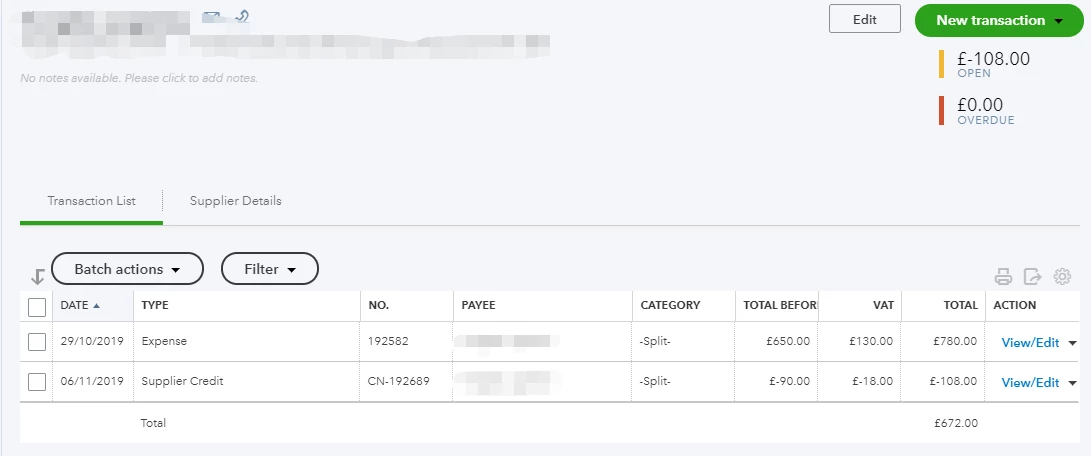


Hi RTT account


You will have to allocate the deposit to the suppliers/creditors account shown in your screenshot by selecting the supplier in the received from column and creditors/accounts payable in the account column in the adds funds to this deposit section. Although the open and overdue will be zero you will have to link the deposit and supplier credit together by creating a cheque payment > enter the suppliers name in the Payee box > the deposit and supplier credit will appear on the right hand side select add on both > save and close.


26 replies

Level 4
February 7, 2019
A Credit Note if what you use to post a credit to a customer.  Do you mean a Supplier Credit?
February 7, 2019

The solution will depend on whether you have an option turned on.

If in Company Settings you have the option "automatically match credits" turned on, as soon as you enter a Credit Note a Payment of Zero will be shown on the next line on the same date.

If you want to change which invoice this has been allocated to then click on the payment and select the invoice that you intended to pay off with the credit note.

If the automatic option is not turned on then go to the Supplier, select write cheque from dropdown, and then add invoice from list on right and credit note, if the invoice is more than the credit note adjust the amount next to the invoice to be same as the credit note and insure the total for the transaction at top is £0.

Level 4
February 7, 2019
The setting " Automatically apply credits" is only for customers. The question is for a supplier. "Automatically apply bill payments" will not apply a vendor credit unfortunately
January 15, 2021

Hi there, @Ochilview.


Thank you for joining the thread. I can share with you the detailed steps on how to link the deposit to the supplier credit in QuickBooks Online.


If you've already recorded a Supplier Credit and Bank Deposit for the refund or supplier's credit transaction, you can either choose a Cheque or Expense to link the deposit to the supplier credit.


Here's how:


  1. Review the transactions recorded from the supplier's Transaction List to ensure deposit and supplier credit is recorded correctly.
  2. Go to the (+) New icon, then select Cheque under Suppliers.
  3. In the Payee drop-down, select the supplier name.
  4. Leave the Ref/Cheque no., Payment dateAmount, and Memo fields blank.
  5. In the Add to Expense or Add to Cheque section, select the Add tab for the outstanding supplier credit and deposit.
  6. Select Save and close.


To learn more about handling supplier credits and refunds in QuickBooks Online, you can check out this article. In case you want to pay your future bills using supplier credits, you can as well check out the instructions provided under Scenario 2: Pay bills using supplier credits.


If you have other QuickBooks questions, please feel free to leave a comment below. I'll be right here to provide additional assistance whenever you need it. Thanks for coming, keep safe!


I have refunded some supplier credit notes following the steps provided but they are still showing as outstanding on my aged payables report. This is also causing a difference between the aged payables report and trial balance, the difference being the credit notes. Have I missed a step somewhere?
