Get 50% OFF QuickBooks for 3 months*

Buy now
Switch to QuickBooks and 70% off for 3 Months
April 25, 2019
Solved

Bank Feeds

  • April 25, 2019
  • 5 replies
  • 2 views

I have been able to download transactions from my Citibank account to my Bank account in QuickBooks Desktop for 2 years, but now suddenly it does not recognize my Bank account in QuickBooks.  The account has online access activated.  It has not had an issue up until this week.  How do I resolve this?  I do not want to lose the past 2 years of data, so I do not want to create a new account.  Please advise.


Best answer by AlcaeusF

Hello magee508,


Thank you for dropping by here in the Community. I'm here to lend a hand with your concern about uploading bank transactions in QuickBooks Desktop.


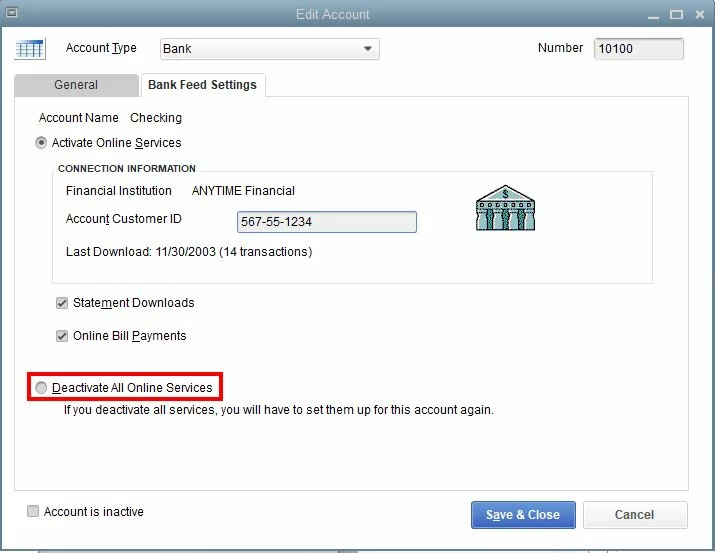
Before uploading the WebConnect file from your bank, you may need to deactivate Bank Feeds first for that specific account.


Here's how:


  1. Click the List tab at the top menu bar.
  2. Select Chart of Accounts.
  3. Right-click the account.
  4. Click Edit Account.
  5. Go to the Bank Feed Settings tab.
  6. Select Deactivate all online services.
  7. Select OK.
  8. Click Save & Close.


Please note that you need to delete or match any pending transactions in your Bank Feeds Center if you get an error message upon performing the process.


For additional insight into deactivating Bank Feeds, please visit the article that I recommend:


Deactivate Bank Feeds for an account.


Please keep in touch with me here should you need any further assistance with uploading your bank data using the WebConnect feature. The Community always has your back.

5 replies

AlcaeusF
Level 14
April 25, 2019

Thanks for letting me know about the issue you're getting, @magee508.


I'm here to help make sure that you're able to download bank transactions in QuickBooks Desktop (QBDT).


I checked if there's an ongoing issue about this, but there isn't currently one. QuickBooks is dependent on what your bank shares with us and it’s possible that they're experiencing technical difficulties. I suggest reaching out to them to verify what causes this problem when downloading transactions.


In the meantime, you can import bank transactions using our WebConnect feature. There are two ways on how to do this:


Option 1. From outside QuickBooks:


1. Log into your bank through a web browser. Use your customer ID and PIN or password.
2. Download and save the online transaction activity via QuickBooks WebConnect (.QBO) file, then import them.


Option 2. Inside QuickBooks:


1. Go to the Banking menu at the top, then pick Bank Feeds and Bank Feeds Center.
2. On your bank, then select Download Transactions.
3. A QuickBooks browser window opens and displays your bank's website. Enter your customer ID and PIN or password.


This should get you the most recent transactions. For additional information, check out this article for further guidance: Download Bank Feed transactions.


Please let me know how the call goes. I'm always here if you need anything else or should you have additional questions. Have a great rest of the day.

magee508Author
April 25, 2019

I have done all those steps.  However, I get a message box that says:
Select Bank Account.  QuickBooks does not have an online account to handle these transactions.  Please make a selection below.  

And then it asks me to choose "Use an existing QuickBooks account" or "Create a new QuickBooks account"

However when I choose "User an existing QuickBooks account", it does not list the bank account that I do already have set up with online access.  I have been able to access the bank account for 2 years but suddenly QuickBooks now cannot connect.


Please advise.

June 7, 2019

Downloaded transactions from bank to QB bank acct until 5/23/19. Used same procedure I used for past 2 years. No problem. Tried on 6/6/19 got screen msg to contact my bank. Did so. They say account is OK. Bank and QB account names differ. They always have. Must they be the same? Thanks... DonZ 

Level 7
June 7, 2019

I appreciate you reaching out to your bank for assistance in verifying the issue, @Knuk5685.


The name in QuickBooks doesn’t have to be exactly the same with what is showing on your financial institution’s website, as long as you’re able to download the transactions with the correct account. 


If you haven’t encountered any error message aside from the statement to contact the bank, I recommend updating QuickBooks Desktop to the latest release. Once done, follow the steps shared by my colleague @AlcaeusF to deactivate online service for this account.


Right after, enable the feature and start downloading transactions again. For more information about the process, refer to the article provided above.


Here’s an article about fixing banking errors in QuickBooks Desktop that may help: Fix OL and OLSU Bank Feed errors.


That should do it. Please let me know how everything goes or if you need anything else. I’m more than happy to help. Have a good one!
 

October 10, 2019

I don't see any way to start a new message thread, so I'm going to add on to this one ...

I setup bank feeds for 5 accounts at the same bank (South State Bank) over a year ago and it's been working fine until this morning when I got a QL202 error when trying to download bank feeds on several accounts (see attached screen grab). I could login fine via the bank website using the latest versions of Firefox, Edge, and Internet Explorer. I talked with the bank's tech support and they could find no problems with my accounts that would prevent the bank feeds from working.

I then deactivated online services for one account and tried to reactivate it - no joy.  I get an Error 1013 when I try to connect now. I went through all the steps in the Fix OL and OLSU Bank Feed Errors page and none of them helped.  I even created a new QB company and bank account and could not connect with it. Here is the last set of entries in my CONNLOG.TXT log file when I tried it:

20191010 12:38:15: Marketing session sending to: https://msa.intuit.com/banking/fimkt/basic/intuit_BASICqb.ini
20191010 12:38:15: QFN: Beginning get from https://msa.intuit.com/banking/fimkt/basic/intuit_BASICqb.ini
20191010 12:38:15: QFN: End get from https://msa.intuit.com/banking/fimkt/basic/intuit_BASICqb.ini, netstatus 0
20191010 12:38:27: QFN: Beginning send to https://ofx1.evault.ws/OFXServer/ofxsrvr.dll
20191010 12:38:29: ***QFN kQFFInished: returns 67305972
20191010 12:38:29: QFN: End send to https://ofx1.evault.ws/OFXServer/ofxsrvr.dll, netstatus 29


Any assistance would be of great help!


March 30, 2020

did u updated your desktop 2018?  i did and have had the same issue

IamjuViel
Level 8
March 30, 2020

Hello, @rbartle1.


Let's disconnect and reconnect the same bank account with QuickBooks. Let me guide you with the steps.


Before you disconnect the account, make sure to add and match the existing downloaded transactions.


Here's how to disconnect:

  1. Click Banking.
  2. Go to the Banking tab.
  3. Choose the account you want to disconnect, then click the Pencil icon.
  4. Click Edit account info, then put a checkmark in the Disconnect this account on save box.
  5. Click Save and Close.

Then, connect the same account using the new bank URL. Transactions from the past 90 days will be added. You'll have to exclude them if they're already added to the system.


Let me know if you need more help. I'm just here.

June 28, 2020

I created a new CC account with the same name but added a "*" at the end.  I then changed the old account name to match the new account name by adding the "*".  QB will ask to merge these accounts.  After merging you can reactive the bank feeds.  I did this through the bank feed center as previously described.

The only downfall is that all the transactions will now show to be unreconciled.  I fixed this by reconciling all transactions up to my last statement date leaving only the transactions in the current statement.  This worked and all feeds are reactivated.  this is the only fix I found.

July 11, 2022

I followed all the steps as suggested in this earlier thread.  I created a New GL account, then merged the Old GL account with the New GL account.  All Bank feeds were deleted.

Then I logged into my BOA account, selected the transactions I wanted to download into the NEW GL account and it now recognizes the New GL account, where as before, it didn't.

But, when I select download, it says there are no new transactions to download into the new GL account when in fact, there are dozens of new transactions.  Any suggestions would be greatly appreciated.  I have several Credit card accounts with multiple card numbers on each credit card for all the employees if this has anything to do with my problem.

Tori B
QuickBooks Team
July 11, 2022

Good afternoon, @justinsachs


I appreciate you taking the time to follow all the steps included in this thread and sharing those great details. 


Since none of the suggested steps are working for you, I recommend contacting our Technical Support Team. This way, one of our tech support agents can review your account in a secure environment and utilize their tools to remote into your screen to take a deeper look. If needed, the agent can submit this issue to our Engineering Team for further investigation. 


You can use the link I've included below to connect with an agent directly.


I'm only a reply away if you have any additional questions or concerns. Have a good one!