
SUMMER SAVINGS 90% OFF QuickBooks for 3 months* Ends 8/27

Buy now

Switch to QuickBooks and 70% off for 3 Months
Mar 19, 2019 10:31 PM UTC
Solved

Deleted payroll check accidentally

I deleted payroll checks that I thought were duplicates on my reconciliations page from 2018 went to look up payroll information and those checks are gone from the employee payroll, how can I remake checks?

BettyJaneB
Level 9
Mar 20, 2019 12:50 AM UTC

Hi there, @Rattleonco.


Glad to have you here in the Community. I'd be happy to help share some information on how you can recreate paychecks in QuickBooks Desktop.


If you've created a backup copy of your company file prior to the deletion of paychecks, then you still have the option to restore it. If not, you'll need to recreate an unscheduled payroll and enter the same information of the paychecks that you've deleted. 


To do that:
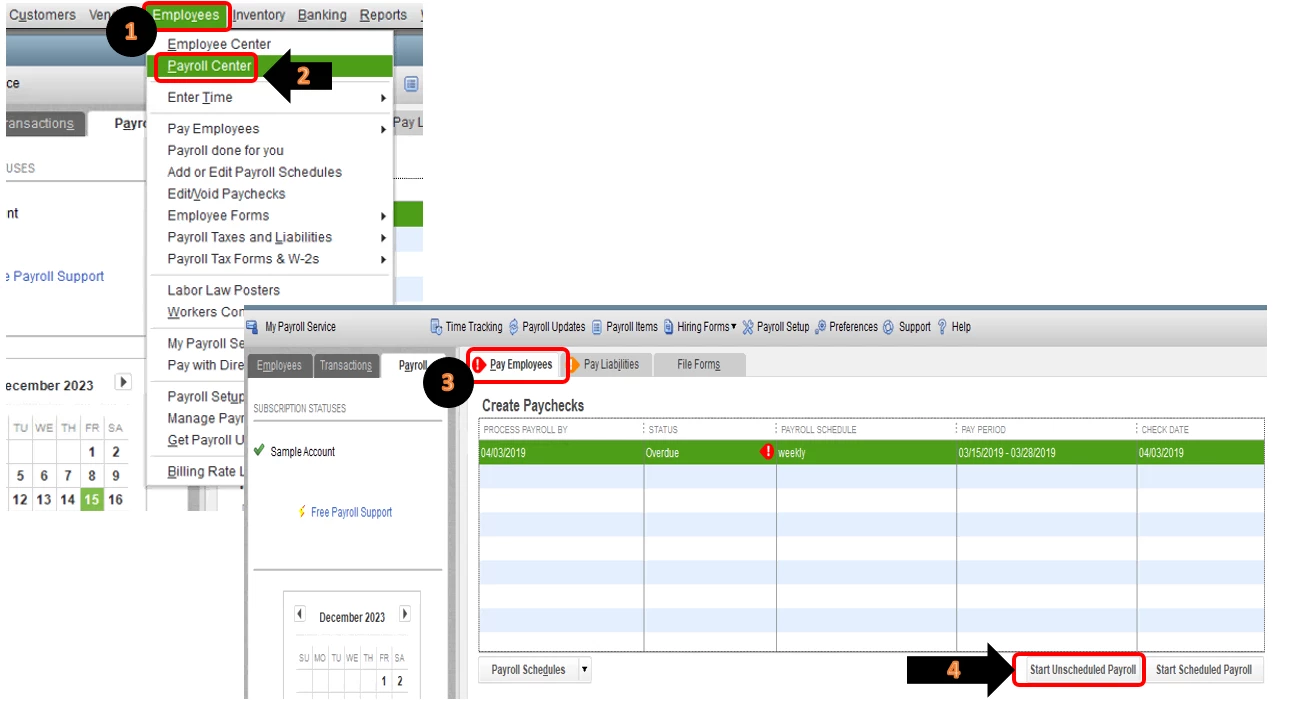
  1. Click on Employees at the top menu bar.
  2. Select on Payroll Center.
  3. In the Pay Employees section, select on Start Unscheduled Payroll.
  4. Select the employee or employees you're paying.

To get more information about creating paychecks in QuickBooks Desktop, please refer to this article: Create paychecks.


That should do it!


Keep me posted if there's anything else you need about recreating paychecks in QuickBooks. I'm always up for further assistance. Wishing you and your business continued success.

13 replies

BettyJaneB
Level 9
Mar 20, 2019 12:50 AM UTC

Hi there, @Rattleonco.


Glad to have you here in the Community. I'd be happy to help share some information on how you can recreate paychecks in QuickBooks Desktop.


If you've created a backup copy of your company file prior to the deletion of paychecks, then you still have the option to restore it. If not, you'll need to recreate an unscheduled payroll and enter the same information of the paychecks that you've deleted. 


To do that:

  1. Click on Employees at the top menu bar.
  2. Select on Payroll Center.
  3. In the Pay Employees section, select on Start Unscheduled Payroll.
  4. Select the employee or employees you're paying.

To get more information about creating paychecks in QuickBooks Desktop, please refer to this article: Create paychecks.


That should do it!


Keep me posted if there's anything else you need about recreating paychecks in QuickBooks. I'm always up for further assistance. Wishing you and your business continued success.

Jun 27, 2024 2:38 AM UTC

Deleted check had no federal taxes taken out. How to fix?

Bryan_M
QuickBooks Team
Jun 27, 2024 4:53 AM UTC

Thanks for joining this thread, @68guy.


Let me share the reasons why your deleted check had no federal taxes taken out.


The Federal Income Tax (or withholding) is calculated based on the Employee's W-4, Pay frequency, Gross wages, and Percentage or wage bracket method. 


If the W-4 form of your employee does have the "Exempt" status below step 4(c), the federal tax won't show in the paycheck. 


The same goes when the employee doesn't belong to the Pay frequency, Gross wages, and wage bracket method used by QuickBooks to identify who needs to have federal tax. Check out this article for more info: Understand how your payroll taxes are calculated.


Also, ensure that your tax table is updated. Then, review the payroll setup of your employee.


You can read this article if you want to view your company's total payroll wages, taxes, deductions, and contributions: Create a payroll summary report in QuickBooks.


Leave a reply below if you have additional questions about processing paycheck and its taxes. We'll be willing to lend a hand. Keep safe, and have a good day.