
Get 50% OFF QuickBooks for 3 months*

Buy now
Switch to QuickBooks and 70% off for 3 Months
January 14, 2019
Solved

cannot email pending transaction error

  • January 14, 2019
  • 1 reply
  • 0 views

I have always marked the invoices that are for work that has not been completed as pending, so that I can keep track of work that needs to be done.


Last few weeks when I try to move to the next or previous invoice I get the prompt - 

"You have changed the transaction. Do you want to record your changes?"


When I chose "yes" I get this message -

"This transaction is marked as pending. " "You cannot email pending transactions."


It will keep repeating this pattern. I am not trying to email, just move back and forth between invoices. It will not let me keep anything marked as pending. What am I missing?


Thanks for any input!
Best answer by Charies_M

Thanks for coming here, TheGoodStitch.


Let me help  you get rid of the prompt message you're getting when working with invoices.


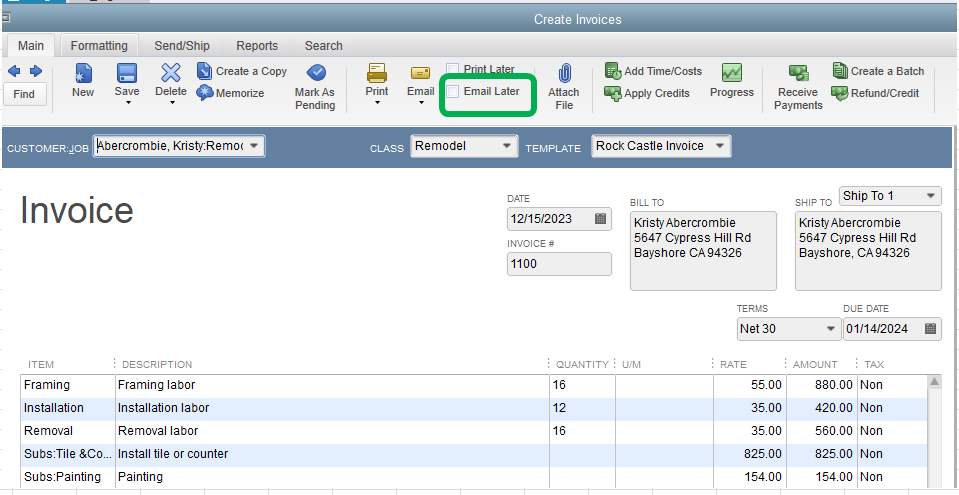
It's possible that the Email Later box was checked from your invoice. To resolve this, we'll need to those check mark from Email Later box. I've attached a screenshot for your reference.

  1. Open the invoice.
  2. Remove the check mark from the Email Later box.
  3. Click Save & Close.


In case you need help from a live technical support, feel free to get touch with our Care Support Team.

Here's how to contact support:

  1. Go to: https://help.quickbooks.intuit.com/en_US/contact.
  2. Select QuickBooks Desktop.
  3. Select your QuickBooks Desktop version.
  4. Select a topic. 
  5. Click the Get Phone Number button.

That should do it. Let me know if you need more help with this or questions while working with invoices. I'm always here to help.

1 reply

Charies_MAnswer
Level 9
January 14, 2019

Thanks for coming here, TheGoodStitch.


Let me help  you get rid of the prompt message you're getting when working with invoices.


It's possible that the Email Later box was checked from your invoice. To resolve this, we'll need to those check mark from Email Later box. I've attached a screenshot for your reference.

  1. Open the invoice.
  2. Remove the check mark from the Email Later box.
  3. Click Save & Close.


In case you need help from a live technical support, feel free to get touch with our Care Support Team.

Here's how to contact support:

  1. Go to: https://help.quickbooks.intuit.com/en_US/contact.
  2. Select QuickBooks Desktop.
  3. Select your QuickBooks Desktop version.
  4. Select a topic. 
  5. Click the Get Phone Number button.

That should do it. Let me know if you need more help with this or questions while working with invoices. I'm always here to help.

January 14, 2019

It sure was! Thanks for the help!! Much appreciated.