Get 50% OFF QuickBooks for 3 months*

Buy now
Switch to QuickBooks and 70% off for 3 Months
August 20, 2020
Solved

Templates

  • August 20, 2020
  • 1 reply
  • 3 views

I created a copy of a invoice template how do I rename it.

Best answer by Mark_R

Hi there, @Allied3.


I'd be happy to help rename your created template by editing it. Here's how:


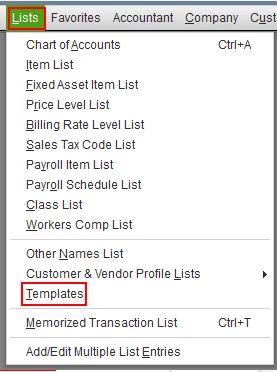
  1. In your QuickBooks Desktop, go to the Lists menu and select Templates.
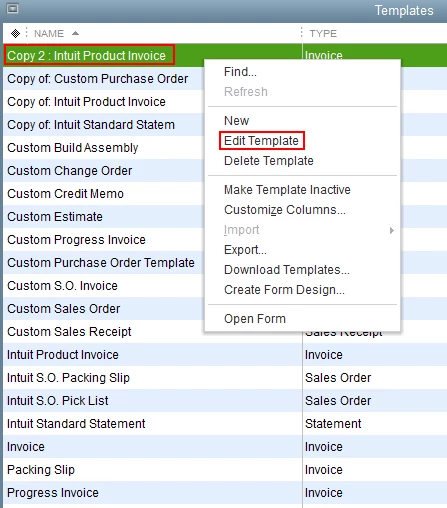
  2. Find the created template, then right-click.
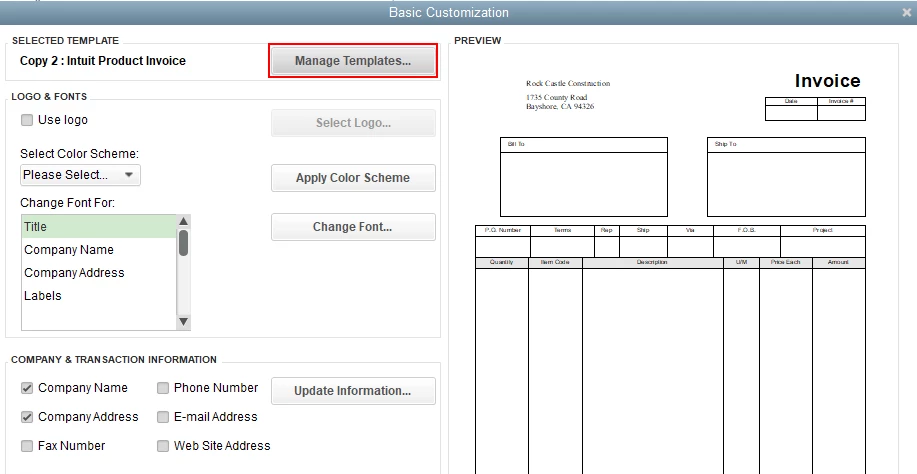
  3. In the Basic Customization window, click the Manage Templates button.
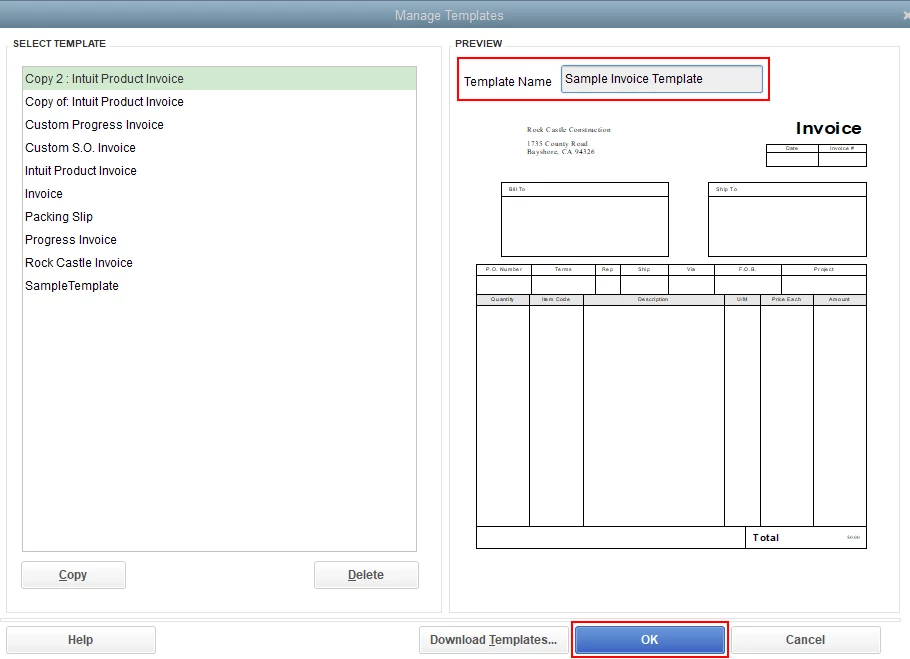
  4. Enter the template name in the Template Name field.
  5. Click OK once finished.

I'm adding this article to learn more about customizing form templates: Use and customize form templates.


Just in case you encounter any issues when using your customized templates, here's an article you can read to fix it: Fix common issues when you use and customize templates.


Keep in touch if you need any more assistance with this, or there's something else I can do for you. I've got your back. Have a good day.

1 reply

Mark_RModeratorAnswer
Moderator
August 20, 2020

Hi there, @Allied3.


I'd be happy to help rename your created template by editing it. Here's how:


  1. In your QuickBooks Desktop, go to the Lists menu and select Templates.
  2. Find the created template, then right-click.
  3. In the Basic Customization window, click the Manage Templates button.
  4. Enter the template name in the Template Name field.
  5. Click OK once finished.

I'm adding this article to learn more about customizing form templates: Use and customize form templates.


Just in case you encounter any issues when using your customized templates, here's an article you can read to fix it: Fix common issues when you use and customize templates.


Keep in touch if you need any more assistance with this, or there's something else I can do for you. I've got your back. Have a good day.

July 27, 2023

Cannot edit template

DivinaMercy_N
Moderator
July 27, 2023

Hi there, @Sajaahath. I want to ensure that your concern about editing the template will be sorted out.


I’ve seen you’ve posted a similar concern in the Community space. My colleague has already provided brief information regarding your inquiry about editing a template. If you haven't been notified about the response, please check out this link to read the recommendation: Cannot modify printing template.


I'm always here ready to lend a hand if you have other concerns managing your templates. Have a good one, and stay safe.