
Get 50% OFF QuickBooks for 3 months*

Buy now
Switch to QuickBooks and 70% off for 3 Months
November 4, 2018
Solved

Below the line expense

  • November 4, 2018
  • 2 replies
  • 6 views

How Do I identify a specific expense to be 'below the line' on P&Ls

Best answer by vpcontroller

@smilingcas


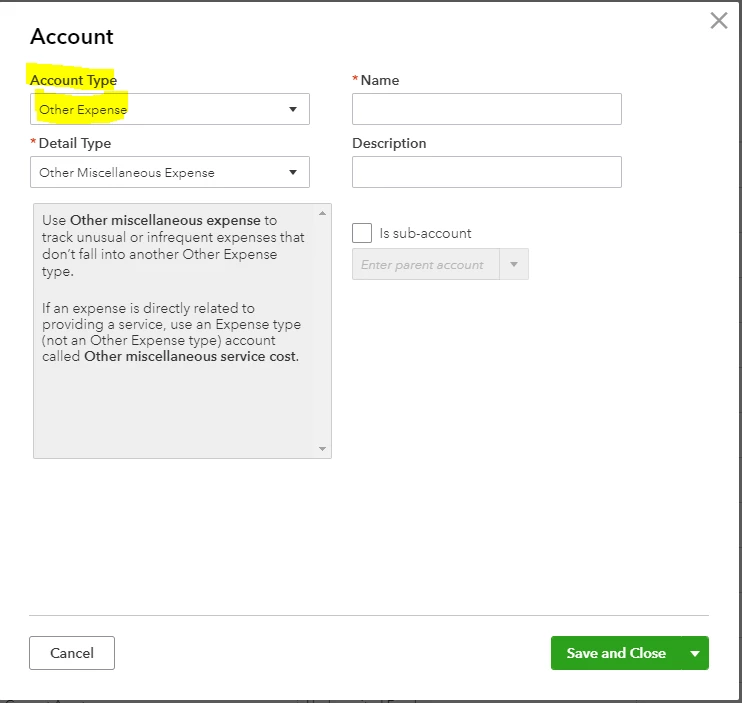
You will need to select "Other Expense as Account Type" in the Chart of Accounts. For the Detail Type, you can select from the list or just Other Miscellaneous Expense. That way the expense category line will show below the Net Operating Income as Total Other Expenses at the bottom before the Net Income line.

.
2 replies

Rustler
Level 15
November 4, 2018

Other expenses is the only thing that posts at the bottom of the P&L, whether that is below the line to you or not I am not sure


If you mean after net income, not something QB will do, you would have to export the P&L and format it the way you want in excel

November 4, 2018

I tried to categorize the account as 'other business expense'. That didn't seem to work. I also have a category called 'other misc service cost'. Those are the only two that have 'other' in the title. 

vpcontroller
Level 7
November 4, 2018

@smilingcas


You will need to select "Other Expense as Account Type" in the Chart of Accounts. For the Detail Type, you can select from the list or just Other Miscellaneous Expense. That way the expense category line will show below the Net Operating Income as Total Other Expenses at the bottom before the Net Income line.

.

April 10, 2019

My QBO P&L does NOT show "net operating income" any ideas why? Any way to fix it?


It shows "total expenses" and then "other expenses" section, but NO "net operating income" in between the two


thanks

April 10, 2019

Hello there, ElenkinS.


The Net Operating Income typically shows in the Profit and Loss report. Since it's not showing in your end, I'd recommend contacting our QuickBooks Customer Care team. They can help you further with this concern. Also, I'd make sure to pass your experience along to our engineers so they can look into it.


Here's how to contact them: 

  1. Go to Help (question mark icon).
  2. Click Contact us.
  3. Enter a brief description of your concern in the How can we help? field and click Continue.
  4. Choose an option in reaching our live agent.

Please let me know if you have more questions. I'd be right here to answer.
