Get 50% OFF QuickBooks for 3 months*

Buy now
Switch to QuickBooks and 70% off for 3 Months
March 13, 2019
Solved

Entering bills report

  • March 13, 2019
  • 2 replies
  • 1 view

When I enter a bill from a vendor there is a print button at the top.  When I print the bill it only shows the account name not the account number.  For example, it has Advertising not 7230 Advertising.  How do I get it to show the account number?

Best answer by AldrinS

Hi there, Susan C.


I'd like to join this discussion and provide additional clarification regarding the account number.


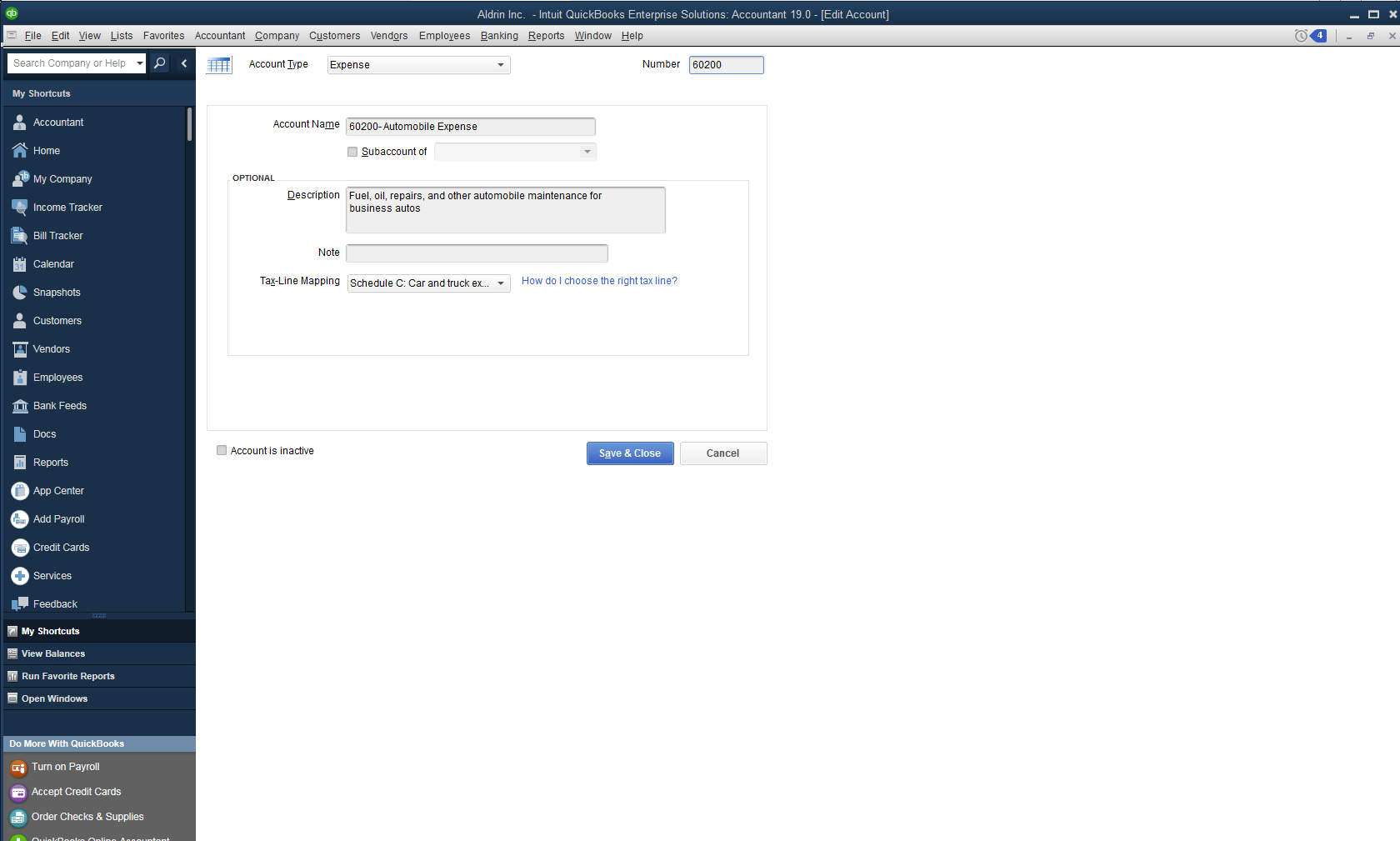
QuickBooks currently doesn't have an option to include the account number when printing bills. However, you could manually add the account number together with the account's name in the Chart of Accounts. The steps below will guide you on how to do it:

  1. From the Lists account, choose Chart of Accounts.
  2. Right-click the expense account.
  3. In the Account Name field, add the account number.
  4. Click Save & Close.


This way, the account number will be included when you print the bill. I've attached a screenshot below to show you how it would look like.


Please keep in touch if there's anything else I can help you with. I've always got your back. Thanks for reaching out, wishing you and your business all the best.

2 replies

Rose-A
Level 10
March 14, 2019

Glad to see you here in the Community, Susan C.

I'm here to help you show the account and account number when printing a bill report.


I can provide you with easy steps on how you can pull up a report that shows the account name and account number. You can run and customize the Unpaid Bills Details report.


Here's how:


  1. Click Reports at the top menu bar.
  2. On the drop-down list, click Vendors & Payables then choose Unpaid Bills Detail.
  3. Click Customize Report.
  4. Under Displays, type and search for Account.
  5. Hit OK.


You may find this article helpful: https://quickbooks.intuit.com/community/Reports-and-accounting/Customize-reports-in-QuickBooks-Desktop/m-p/202663.


Should you need more help about vendors and bills report, don't hesitate to let me know. Have a good one.

Susan CAuthor
March 14, 2019

This is the document I would like to see account numbers.


AldrinSAnswer
Level 4
March 14, 2019

Hi there, Susan C.


I'd like to join this discussion and provide additional clarification regarding the account number.


QuickBooks currently doesn't have an option to include the account number when printing bills. However, you could manually add the account number together with the account's name in the Chart of Accounts. The steps below will guide you on how to do it:

  1. From the Lists account, choose Chart of Accounts.
  2. Right-click the expense account.
  3. In the Account Name field, add the account number.
  4. Click Save & Close.


This way, the account number will be included when you print the bill. I've attached a screenshot below to show you how it would look like.


Please keep in touch if there's anything else I can help you with. I've always got your back. Thanks for reaching out, wishing you and your business all the best.