
SUMMER SAVINGS 90% OFF QuickBooks for 3 months* Ends 8/27

Buy now

Switch to QuickBooks and 70% off for 3 Months
Oct 25, 2018 4:28 PM UTC
Solved

Accounts Receivable by Class

Is there a way to run the A/R Aging by Class?  I am using QB online for Contractors.

vpcontroller
Level 7
Oct 25, 2018 5:27 PM UTC

Currently, such an option to run the A/R Aging by Class report is not available in QBO yet.
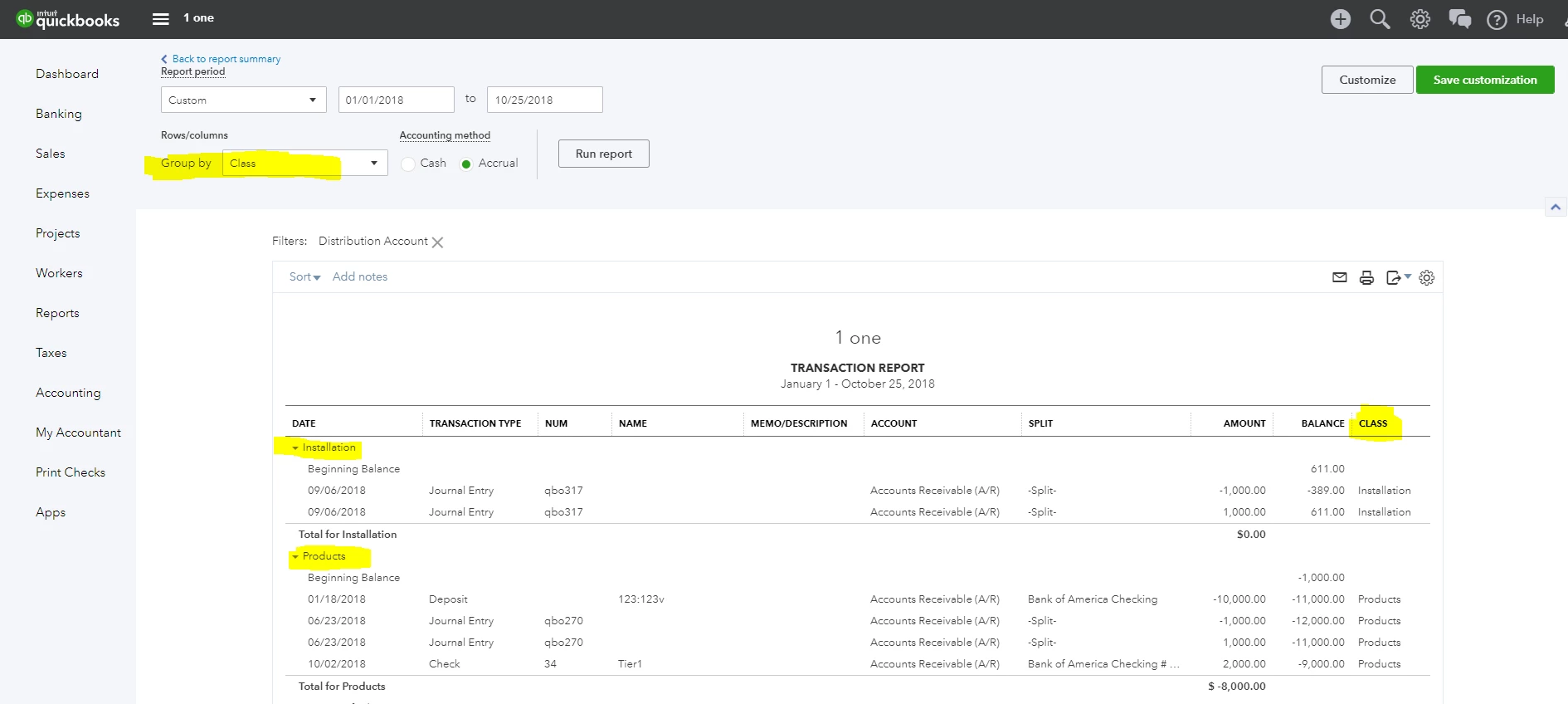
The workaround is to run the Account Receivable transaction report from the Balance Sheet (Run the Balance Sheet report and click the Account Receivable balance amount link). You can Group this report by Class. You can also customize and add a Class column to the report. But it will in AR detail format, not AR Aging format. See screenshot below for reference.

.
25 replies

vpcontroller
Level 7
Oct 25, 2018 5:27 PM UTC

Currently, such an option to run the A/R Aging by Class report is not available in QBO yet.
The workaround is to run the Account Receivable transaction report from the Balance Sheet (Run the Balance Sheet report and click the Account Receivable balance amount link). You can Group this report by Class. You can also customize and add a Class column to the report. But it will in AR detail format, not AR Aging format. See screenshot below for reference.

.

Nov 7, 2018 5:27 PM UTC

Thanks for this response.  I cannot figure out why "class" isn't available in my group by menu.  Can you advise?  I assign classes in AR and AP.  Thanks!

QuickBooks Team
Jan 20, 2023 3:03 PM UTC

How does one make a request for a product enhancement?  It is still ridiculous that this software can’t do something as simple as an A/R aging by class.  I understand that Intuit has no motivation to make improvements here because there is no meaningful competition in this area…but come on.  

Thank you posting workarounds, but this isn’t a satisfactory solution.   I want to run a report that gives me the information I need.   I don’t want to have to run a different report, dump it to excel and then manipulate it to get the information I want.  


the fact that this thread is more than four years old and there is no solution still I guess tells me all I need to know about how much Intuit cares about it’s customers.    


I understand the convenience of pulling a report with the data you need in just one snap, @Frank0219. With this, I’ll walk you through the steps of submitting your request to our Product Developer.


I do agree with you that adding more customizations and functionality would make the program better and more flexible. Since you wish to have the ability to run A/R aging by class, I recommend sharing your idea to our product development team. 


Here’s how:


  1. Go to the Gear icon.
  2. Under the Profile column, select Feedback.
  3. Enter your suggestions, then click Next.


Please know that we’re unable to provide a specific time frame as to when this feature will be available. You'll want to track your suggestion through this website. You can also visit our blog to keep up with all of our recent events and developments.


I’ve added these resources to guide you with filtering to get the data you need, and saving it with its current customization settings:


If I can be of assistance while working in QuickBooks, please let me know. I'd be more than willing to lend you a hand. Stay safe!