
Get 50% OFF QuickBooks for 3 months*

Buy now
Switch to QuickBooks and 70% off for 3 Months
January 14, 2023
Question

Desktop: Tax Form Worksheet Error

  • January 14, 2023
  • 11 replies
  • 55 views

I just upgraded to Premier Plus 2023. I am running manual payroll for a client with 3 employees.


I am having a problem with being able to get the tax form worksheets in Excel. I have seen a few others post about this issue. The image below is the error I am getting. I also noticed any other excel report listed under the the More Payroll Reports in Excel also gives me an error.


I have reinstall updated and run the repair tools on QB 2023.

I have done a clean install of Microsoft 365.

I have performed and SFC Scan and repaired windows image.


The report function was working fine when I was still running QB Pro 2022. I am dead in the water trying to get the tax from worksheets and I am about to go insane. Has anyone successfully resolved this issue? I have no problems opening any other report (like a P&L of Balance Sheet) in excel.
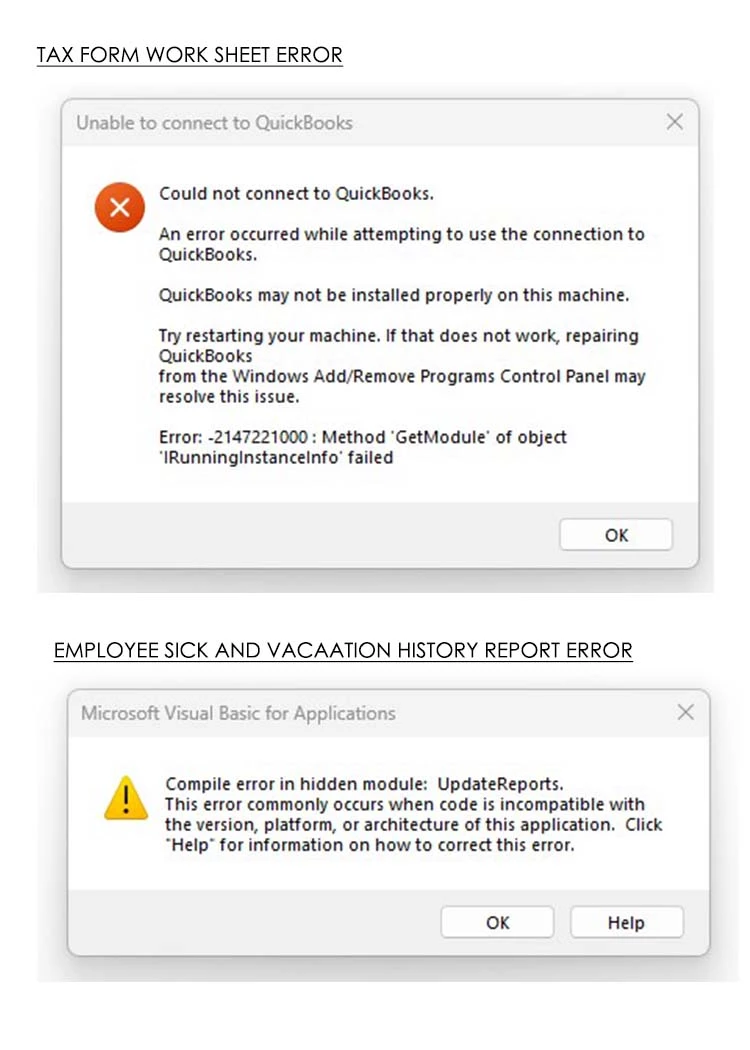
 

This error appeared when I tried generating the Summarize Payroll Data in Excel report.
11 replies

Daniela_A
January 14, 2023

Let me ensure we'll be able to fix these errors, @Lain.


It's possible that there's a minor data damage in the report that's causing these errors to occur. Let's make sure your company file is up to date you would have the latest product improvements and fixes. Here's how:


  1. Go to Help and select Update QuickBooks Desktop.
  2. Click Update Now, then select Get Updates.
  3. When the update finishes, close and reopen QuickBooks.
  4. When asked to install the update, select Yes.
  5. When the install finishes, restart your computer.


If you're still getting the same result, let's run the Verify and Rebuild Utility tools. These tools will help us repair reports and list damage in your company file. Here's how:


  1. Go to the File menu.
  2. Select Utilities.
  3. Click Verify Data then select OK to close all windows.
  4. Then, go back to the File menu.
  5. Select Rebuild Data under Utilities.
  6. QuickBooks will ask to make a backup before rebuilding your company file, select OK.
  7. Once the rebuild is done, click OK.

Lastly, I recommend reading this article to know what to do if you can't restore your backup company file in QuickBooks Desktop: Fix backup company file issues


Please let me know if you need further assistance in handling your reports. Simply add a reply and I'll help you out. 

July 20, 2023

Do you have the fix? I think it's not in the last updated. 

QuickBooks Team
July 20, 2023

Let's resolve the error you're having to generate your tax form worksheet successfully, bohnne.


First, make sure that your computer meets the program's system requirements. It will guarantee that the application is compatible with your setup and that you do not encounter any unexpected behavior when using it. This link contains detailed information about system requirements for QuickBooks Desktop 2023. Then, keep your software up-to-date to have the latest features and fixes by updating QuickBooks Desktop to the latest release.


Once done, generate the Tax Forms Worksheets report again. If you're still having an error, run the Quick Fix my File from the QuickBooks Tool Hub. For detailed guidance on how to download and install QuickBooks Tool Hub and run Quick Fix my File, refer to this article: Fix company file and network issues with QuickBooks File Doctor.


If the same thing happens, follow the steps from Microsoft to repair Microsoft Office. Then go back into QuickBooks and export a report. We can also toggle your Windows UAC settings on and off. This should reset anything blocking the export feature. Here's how: 


  1. Open the Windows Start menu. Type User Account Control Settings into the search and open User Account Control Settings.
  2. Select and move the slider to Never Notify. Then select OK.
  3. Restart your computer.


If you can export a report, everything is fixed. If you can't, you may need to follow the steps from Microsoft to uninstall and reinstall Excel. If the problem persists, I recommend contacting our Technical Support Team again. They'll further investigate what's causing this issue. Here's how to reach them:


  1. Go to the Help menu at the top.
  2. Select QuickBooks Desktop Help.
  3. Click Contact Us.
  4. Enter a brief description of your issue in our Ask a question (or tell us what's wrong) field.
  5. Hit Let's talk.
  6. Choose a way to connect.


Ensure to review their support hours so, you'll know when agents are available. For more tips about managing reports in QuickBooks Desktop, you can also check out these articles:


Please know that the Community always has your back, so don't hesitate to let me know If I can be of any assistance. Feel comfortable tagging me in your comments. You have a good one. 

January 28, 2023

Check out this issue - with a solution from Big Red Consulting.  I had a similar issue with QB Desktop 2022 and this solved it.  Disappointed (but not surprised) this hasn't been fixed with (the overpriced) QB 2023 - I'm putting off my own upgrade until absolutely necessary.  Good luck!


https://quickbooks.intuit.com/learn-support/en-us/reports-and-accounting/re-payroll-reports-in-excel-tax-form-worksheets/01/1121040#M163304 

July 20, 2023

Disgustingly, I am having the same problem.  This is the second QuickBooks update I have done (2022 did the same thing to me) where I experienced this problem. This time I called Microsoft as well. It is not a MS issue.  Last year after 8 hours on the phone with low level support and 3 times being transferred to the payroll support group (I don't subscribe to payroll service) who couldn't help me, silently an update was released a few weeks later and the reports worked.  It never occurred to me that I shouldn't have updated to 2023. 

Anyway I spent 5 hours on the phone yesterday with low level support and all I got was disconnected. I have relied on the worksheets, they are excellent for me with 5 or less employees and a small business. I made do with the standard reports but I have no love for Intuit after 17 years of keeping my software updated and raving about how much I love quickbooks.