
Get 50% OFF QuickBooks for 3 months*

Buy now
Switch to QuickBooks and 70% off for 3 Months
May 17, 2022
Solved

Import class

  • May 17, 2022
  • 2 replies
  • 0 views

I am importing invoices from excel into QB. It works well but I cannot import "Class" onto invoices.

Can anyone help with this ?

Best answer by JamaicaA

Congratulations on making your first post here, @JB1234567. I'm here to share some insights about importing invoices with classes that will surely clear things out for you.


I can see the importance of being able to add a class to the invoice. I also understand how this option would benefit your business as well as others. However, this is currently unavailable in QuickBooks Online.


If you used the sample file for importing invoices and you added a class column, you’re unable to map it to QuickBooks. That's the same even if you created the excel file on your own.


As a workaround, you’ll need to assign classes manually after the importing process. You can also look for a third-party application that suits your needs. Just visit the QuickBooks App Center through this link: https://apps.intuit.com/.


The option to add a class when importing invoices is a great idea to implement in the future. I’d suggest sending feedback request to our product development team. They will evaluate these and pick some of them to include in future updates. This way, we can cater to your business needs better. 


Here’s how:
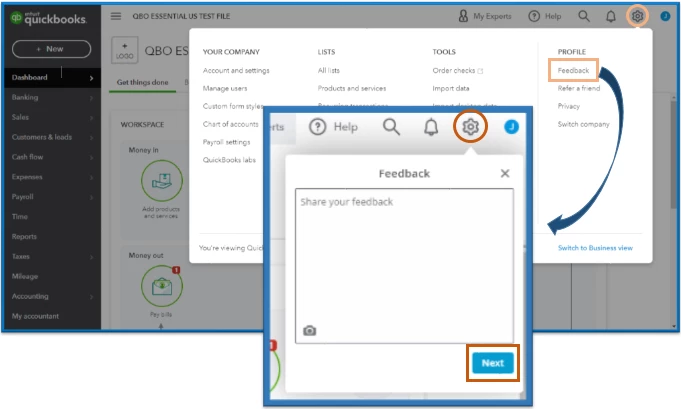
 

  1. Go to the Gear icon.
  2. Under the Profile column, click on Feedback.
  3. Share your feedback. Then, click Next.


You'll want to track your suggestion through this website. You can also visit our blog to keep up with all of our recent events and developments.


To learn more about importing your invoices, you can check out this reference: Import multiple invoices at once. This includes the data you can add into the program along with its process. 


I’ve included these additional resources for receiving invoice payments and to learn more about how class works in QuickBooks: 


Let me know if you need more help with importing invoice transactions. I'll be here to help. Have a great day.

2 replies

JamaicaAQuickBooks TeamAnswer
QuickBooks Team
May 17, 2022

Congratulations on making your first post here, @JB1234567. I'm here to share some insights about importing invoices with classes that will surely clear things out for you.


I can see the importance of being able to add a class to the invoice. I also understand how this option would benefit your business as well as others. However, this is currently unavailable in QuickBooks Online.


If you used the sample file for importing invoices and you added a class column, you’re unable to map it to QuickBooks. That's the same even if you created the excel file on your own.


As a workaround, you’ll need to assign classes manually after the importing process. You can also look for a third-party application that suits your needs. Just visit the QuickBooks App Center through this link: https://apps.intuit.com/.


The option to add a class when importing invoices is a great idea to implement in the future. I’d suggest sending feedback request to our product development team. They will evaluate these and pick some of them to include in future updates. This way, we can cater to your business needs better. 


Here’s how:


  1. Go to the Gear icon.
  2. Under the Profile column, click on Feedback.
  3. Share your feedback. Then, click Next.


You'll want to track your suggestion through this website. You can also visit our blog to keep up with all of our recent events and developments.


To learn more about importing your invoices, you can check out this reference: Import multiple invoices at once. This includes the data you can add into the program along with its process. 


I’ve included these additional resources for receiving invoice payments and to learn more about how class works in QuickBooks: 


Let me know if you need more help with importing invoice transactions. I'll be here to help. Have a great day.

Fiat Lux - ASIA
Level 14
May 18, 2022

@JB1234567 

Prepare your Invoice data with he following template

RefNumberCustomerTxnDateDueDateShipDateShipMethodNameTrackingNumSalesTermLocationClassBillAddrLine1BillAddrLine2BillAddrLine3BillAddrLine4BillAddrCityBillAddrStateBillAddrPostalCodeBillAddrCountryShipAddrLine1ShipAddrLine2ShipAddrLine3ShipAddrLine4ShipAddrCityShipAddrStateShipAddrPostalCodeShipAddrCountryPrivateNoteMsgBillEmailBillEmailCcBillEmailBccCurrencyExchangeRateDepositToBePrintedToBeEmailedAllowIPNPaymentAllowOnlineCreditCardPaymentAllowOnlineACHPaymentShipAmtShipItemDiscountAmtDiscountRateTaxRateTaxAmtDiscountTaxableLineServiceDateLineItemLineDescLineQtyLineUnitPriceLineAmountLineClassLineTaxable
101Janice Johnson01/10/2020 01/12/2020Ground Net 30  110 Main StreetSuite 2000  DallasTX99875 110 Main StreetSuite 2000  DallasTX99875 Special HandlingThank you for your order!     0NYNNY12Shipping 0.02  Y MP3 PlayerBlue MP3 Player255  TAX
101Janice Johnson01/10/2020 01/12/2020Ground Net 30  110 Main StreetSuite 2000  DallasTX99875 110 Main StreetSuite 2000  DallasTX99875 Special HandlingThank you for your order!     0NYNNY12Shipping 0.02  Y Leather CaseLeather Case210  TAX
101Janice Johnson01/10/2020 01/12/2020Ground Net 30  110 Main StreetSuite 2000  DallasTX99875 110 Main StreetSuite 2000  DallasTX99875 Special HandlingThank you for your order!     0NYNNY12Shipping 0.02  Y Gift CardsGift Cards25  TAX
102Leonard Walker Inc01/10/2020    Net 30  9 Winding Road   WinchesterNY12345 9 Winding Road   WinchesterNY12345  Thank you for your order!     0YNNNY      Y HandheldsPortable Game Player1100  TAX


then utilize an importer tool to proceed.

https://transactionpro.grsm.io/qbo


JB1234567Author
May 18, 2022

Thanks very much. Will look at TransactionPro. Appreciate you taking the time to respond

Phil_UK
July 13, 2023

Hi JB1234567,


Thanks for asking this question - I'm now asking the same one! Did you take TransactionPro, and does it work as you expected?


I have to say I find this option looks rather expensive - £440 per year for all of QBO Plus, but another US$299 per year just because want to import data with class information (if we had less than 200 rows per month, we could do it manually, so their "Essentials" package isn't really essential). Since QBO Plus can import journals with class and location information, I really can't understand why they can't allow users to import transaction data with the same information - it's not that different!
