
Get 50% OFF QuickBooks for 3 months*

Buy now
Switch to QuickBooks and 70% off for 3 Months
September 13, 2021
Solved

Direct Deposit

  • September 13, 2021
  • 3 replies
  • 39 views

Direct deposit has repeatedly failed. Funds are taken from our churches account, but never reach our pastors account.
Over the course of 6 weeks, I have spoken with several customer service reps.  I am told each time that Direct Deposit is set up correctly, yet it is still not working.  

We are a small church with 1 paid employee.

Confirmation from QB payroll that they have our churches correct banking account number and our pastor’s correct banking account number.

Confirmation received after sending DD that transaction was successful.

Confirmation from our bank (Regions) that funds are taken from account.  

Any help you can offer will be very much appreciated.  

Best answer by Jen_D

Thanks for posting here with this Direct Deposit concern, @CdSecretary.


I know how it can be frustrating to be held up like this when you just want to get this payroll concern resolved. We want to make sure this is taken care of by the correct department. Please note that this is a public forum and we do not handle account-related concerns to protect our customer's data.


The best team to help you out with this is our Payroll Support people. I know you already called several times for this, but only them can open your payroll history and help with money movement.


When you call, ask the representative to do a Direct Deposit trace. They will give you a transaction number that you can give to the employee's bank so they can locate the funds.

Use these steps to contact us: 


  1. Open QuickBooks and click the Help menu.
  2. Select QuickBooks Desktop Help.
  3. On the pop-up screen select Contact us.
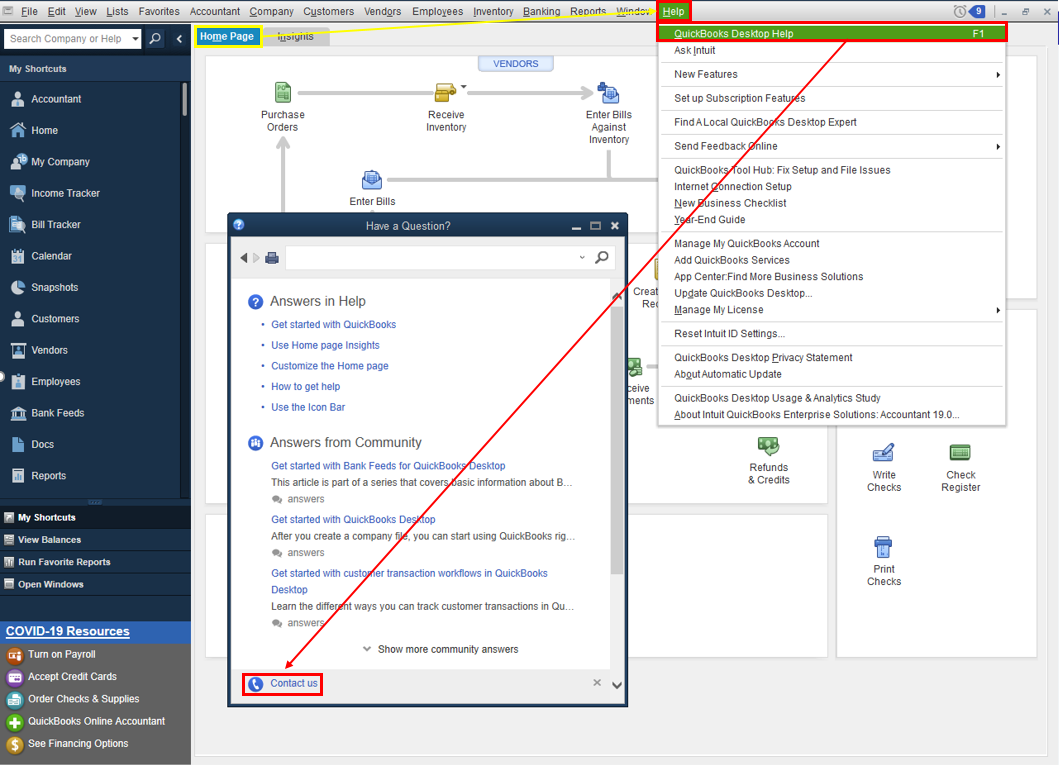
  4. Click the Search for Something else button then type your concern in the Ask us anything box.
  5. Hit Search then scroll down to get your contact options.


Refer to this article to learn more about our contact options and support availability: Contact QuickBooks Desktop support


Here are a few reasons why an employee's check is not deposited to the employee's account:


  • The employee's bank account information was entered incorrectly or invalid.
  • Unable to locate account.
  • Employees bank account details was updated by the bank.
  • Issue with the employee's bank.
  • The check date falls on a weekend or holiday.
  • Payroll was submitted after the cut-off time which is every 5 PM Pacific Standard Time. When it happens, the payroll will be processed on the next banking day.


You can also request for a reversal to return the funds to your account. For the complete instructions and how it is done, see this link here: Reverse a direct deposit


Please update this thread on how the call goes. I want to make sure you're taken care of, and I'll be right here if you need other help with QuickBooks. Have a good one.

3 replies

Jen_D
Jen_DAnswer
Level 8
September 13, 2021

Thanks for posting here with this Direct Deposit concern, @CdSecretary.


I know how it can be frustrating to be held up like this when you just want to get this payroll concern resolved. We want to make sure this is taken care of by the correct department. Please note that this is a public forum and we do not handle account-related concerns to protect our customer's data.


The best team to help you out with this is our Payroll Support people. I know you already called several times for this, but only them can open your payroll history and help with money movement.


When you call, ask the representative to do a Direct Deposit trace. They will give you a transaction number that you can give to the employee's bank so they can locate the funds.

Use these steps to contact us: 


  1. Open QuickBooks and click the Help menu.
  2. Select QuickBooks Desktop Help.
  3. On the pop-up screen select Contact us.
  4. Click the Search for Something else button then type your concern in the Ask us anything box.
  5. Hit Search then scroll down to get your contact options.


Refer to this article to learn more about our contact options and support availability: Contact QuickBooks Desktop support


Here are a few reasons why an employee's check is not deposited to the employee's account:


  • The employee's bank account information was entered incorrectly or invalid.
  • Unable to locate account.
  • Employees bank account details was updated by the bank.
  • Issue with the employee's bank.
  • The check date falls on a weekend or holiday.
  • Payroll was submitted after the cut-off time which is every 5 PM Pacific Standard Time. When it happens, the payroll will be processed on the next banking day.


You can also request for a reversal to return the funds to your account. For the complete instructions and how it is done, see this link here: Reverse a direct deposit


Please update this thread on how the call goes. I want to make sure you're taken care of, and I'll be right here if you need other help with QuickBooks. Have a good one.

September 14, 2021

Thank you for responding.  After speaking with a rep in payroll again, it was finally discovered that the last digit of my employee’s banking account number was left off.  Not sure how this error occurred.  I reviewed the document I sent QB Intuit and it had the correct account number on it.  It has been corrected now and that is my main concern.  

Will you be kind enough to tell me what steps need to be taken when it’s time to pay my employee in a couple of weeks?  I want to make sure DD goes through correctly this time.  Also, I am a confused when to use scheduled or unscheduled.  Will you clarify, please.  I greatly appreciate your help.  Sincerely, Carole

Level 9
September 14, 2021

Appreciate you getting back to us, @CdSecretary.


I'll share some information about the Direct Deposit payroll. Since you've already discovered where the error is, you'll want to make sure your employee's direct deposit info is correct in QuickBooks. 


Here's where you can check:


  1. Go to Employees and choose Employee Center to open your employee list.
  2. Select the employee's name and then the Payroll Info tab.
  3. Tap the Direct Deposit button.
  4. Verify the bank information (Bank NameRouting No.Account No., and Account Type).
  5. Click OK to save the information.
  6. Enter your direct deposit PIN when prompted.


After checking, you are now ready to send a direct deposit payroll for your employee.


About scheduled payroll, this is the payroll type where you have a routine pay period and pay date based on the frequency you choose. The unscheduled payroll is when you need to issue a paycheck outside of your regular pay schedule. It includes bonuses, commission, or termination/final checks.


For details, please refer to these articles below:


Feel free to also browse this link in case you need help with payroll reports. It has payroll report topics that'll guide you: Payroll reports and forms.


Drop a reply anytime if you have follow-up questions or concerns. I'm more than happy to help. Take care and stay safe.

April 27, 2022

I’m having the same problem,I was supposed to get my deposit today and I got nothing I’m about to be kicked out because of this please fix it soon.

Level 6
April 27, 2022

Thanks for posting here in the Community space, @ Sagemerr.


I'm stepping into the thread to share additional information about direct deposit payroll.


When processing employees' pay through direct deposit, the individual financial institution policies determine the exact time direct deposits are posted on the employees' bank. This means that the receiving bank is one of the factors why some of your employees receive their pay earlier than the pay date. 


You can also check with your bank to find out when funds are posted. See When do direct deposits post? for more information.


Otherwise, you may connect with our Support Team and ask the representative to do a Direct Deposit trace. They will give you a transaction number to locate the funds.

Use these steps to contact us: 


  1. Open QuickBooks and click the Help menu.
  2. Select QuickBooks Desktop Help.
  3. On the pop-up screen select Contact us.
  4. Click the Search for Something else button then type your concern in the Ask us anything box.
  5. Hit Search then scroll down to get your contact options.


Refer to this article to learn more about our contact options and support availability: Contact QuickBooks Desktop support


If you need anything else about Direct Deposit, let me know in the comment. I'll be right here to help you with your payroll and all other things in QuickBooks. Have a great day. 
 

June 1, 2022

Absolutly useless. Applied for an increase in direct deposit limits, was advised of the increase and still can't process a single direct deposit paycheck. There is no person to talk with and all you do is chase your tail until you just give up. Life is too short to deal with this.

Adrian_A
Level 8
June 1, 2022

Hi Balling123,


I understand how inconvenient it is when the direct deposit keeps failing.


Since you already applied for an increase, you should be notified through email regarding the status of your request.


If you didn't receive one, you can reach out to our Phone Support team so we can verify its status on our end.


I've also added this reference on what happens next once the request got rejected or not: Check employee's direct deposit status.


You can always mention my name as to how things work on your end. I'll be around to ensure that this gets resolved.

June 2, 2022

Our limit was increased. I tried to process a direct deposit for about 15% of our limit and received error message code 2103. How many time do I have to do this?