
SUMMER SAVINGS 90% OFF QuickBooks for 3 months* Ends 8/27

Buy now
Switch to QuickBooks and 70% off for 3 Months
New Member
October 19, 2026
Question

Expense Claims in QBO

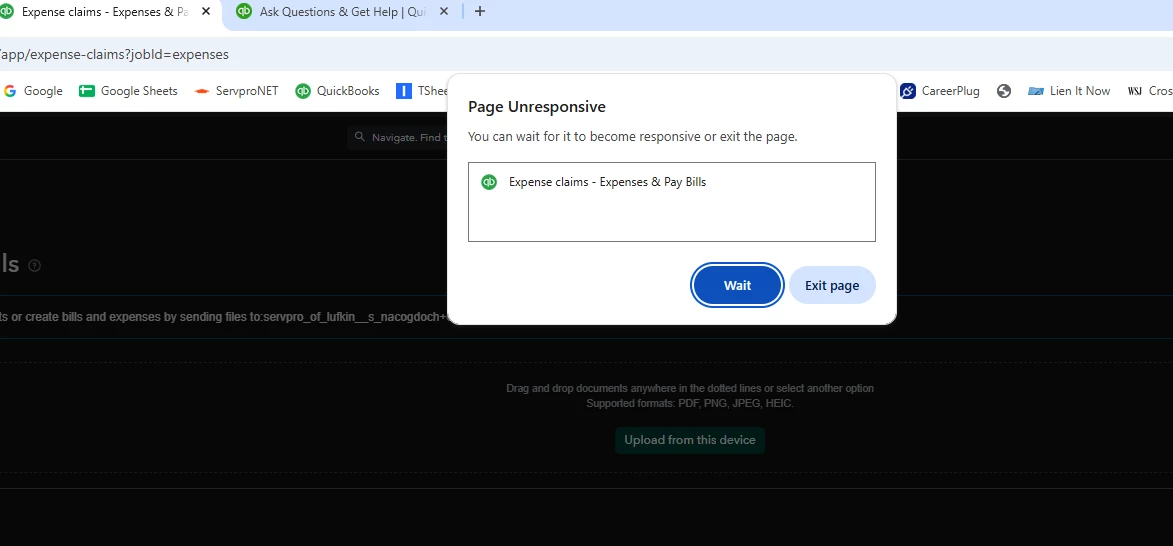
My “expense claims” input started locking up last week. I go in, edit an expense and hit save/close and it locks up qbo every time…..1-2 minutes later I get a “Page Unresponsive…..You can wait for it to become responsive or exit the page” popup. I’ve tried clearded cache, restarted computer, tried on incognito, tried in multiple browsers (chrome and edge), used the app, and tried on multiple office computers. I get the same results every time. 


I need a fix, as my expense claims are stacking up and I’d rather stay on top of them…..but this isn’t practical to input one transaction every 10 minutes.
 

3 replies

QuickBooks Team
October 19, 2026

Thanks for sharing the troubleshooting steps you've already completed. When you finish editing an expense, please click into a neutral field, like the Memo section, or press the Tab key to move your cursor completely out of any active amount or number field before clicking Save and close.


Additionally, how many line items are on the expenses that lock up? This pattern appears most often on transactions with many lines. If the issue consistently affects the same expenses, open one of them and check its row count.


Lastly, does this happen on every expense or only on certain ones?


We look forward to hearing from you.

bhammackAuthor
New Member
October 20, 2026

Well…..I was able to get in and input all of the expense claims yesterday afternoon and no lock-up issues. Thought that was odd. Saw this post, and tried another new expense claim and its locked up as I type this. These are all one-line expense claims. Clicking outside the area before hitting save/close didn’t resolve.

QuickBooks Team
October 20, 2026

To assist you further, I recommend contacting our Intuit experts. They have specialized tools to investigate your account and help resolve this issue.


Feel free to click the Reply button below if you have other questions about QuickBooks.