- Start Your BusinessStart Your Business
- Starting a BusinessThe tools and resources you need to get your new business idea off the ground.
- PaymentsEverything you need to start accepting payments for your business.
- Funding & CapitalResources to help you fund your small business.
- Small Business StoriesCelebrating the stories and successes of real small business owners.
- Self-EmployedThe tools and resources you need to run your own business with confidence.
- Run Your BusinessRun Your Business
- Running a BusinessThe tools and resources you need to run your business successfully.
- AccountingAccounting and bookkeeping basics you need to run and grow your business.
- Cash FlowTax and bookkeeping basics you need to run and grow your business.
- PayrollPayroll essentials you need to run your business.
- TaxesTax basics you need to stay compliant and run your business.
- EmployeesEverything you need to know about managing and retaining employees.
- Grow Your BusinessGrow Your Business
- Growing a BusinessThe tools and resources you need to take your business to the next level.
- Sales & MarketingSpread the word: What you need to know about marketing your small business.
- FundingHow to find funding and capital for your new or growing business.
- Midsize BusinessesThe tools and resources you need to manage your mid-sized business.
- Enterprise Suite BlogThe tools and resources you need to grow your own business with confidence.
- E-CommerceHow to start and run a successful e-commerce business.
- TaxesTaxes
- How to fill out a 1099-NEC formLearn how to fill out and file 1099-NEC forms for independent contractors and freelancers.
- How to file small business taxesLearn how to navigate tax season with confidence and minimize your tax liability with this guide.
- Small business 1099: What you need to know for 2025Navigate the complexities of small business 1099 forms and filings with our comprehensive guide.
- 13 documents to give your accountant for small business taxesYour accountant will need these documents to file your small business taxes successfully.
- What's NewWhat's New
- NewsBrowse the latest news, press releases, and reports from QuickBooks.
- AI Resource HubFind the latest on Artificial Intelligence.
- Small Business DataThe latest research and insights for Small Businesses from QuickBooks.
- Small Business StoriesCelebrating the stories and successes of real small business owners.
- Holiday SuccessEverything you need to thrive during your business's busiest seasons.
- AI InnovationsBrowse the latest AI innovations in QuickBooks on the Intuit platform.
- ToolsTools
- All ToolsFree accounting tools and templates to speed up and simplify your workflow.
- AI-Powered Invoice GeneratorTry out this free invoice generator to create an invoice online using Intuit Intelligence.
- Payment Cost CalculatorFind out how much you could save by switching to QuickBooks Payments.
- Paycheck CalculatorAccurately estimate pay for all your employees.











Table of contents
Table of contents
You could save up to 25% on transaction costs².
Speak with us now to see if you qualify.
Talk to sales 1-800-515-8366
Monday - Friday, 6 AM to 4 PM PT
Shopping for accounting software can sometimes feel confusing, with pricing varying based on the features and services you need. A platform advertised at one price might increase as you add users, modules, and advanced tools.
When evaluating accounting software costs, it’s important to consider more than just the subscription price. Additional expenses like user seats, feature tiers, implementation fees, training, integrations, and ongoing support can all increase your total cost of ownership. This guide breaks down typical pricing by business size, explains what drives costs up or down, and shows you how to estimate your true annual spend. With this information, you’ll be better prepared to build a more accurate budget and get the most value from your software.
Typical accounting software costs by business size
Annual accounting software pricing varies based on your business size and priorities. According to Software Connect, costs can range from around $500 per year for small businesses with basic accounting and invoicing needs to more than $150,000 for enterprise organizations requiring full ERP functionality and advanced software customization. Here's what many businesses pay annually, considering the total cost of ownership.

Why is the range so wide?
Accounting software isn’t priced as a one-size-fits-all solution. It scales with the complexity of your business. A five-person team using standard invoicing tools will pay far less than a 50-person company managing inventory, payroll processing, and multi-location operations.
What you’re paying for
With accounting software, you’re not just paying for a login. You're paying for a bundle of components that work together to run your financials. The more complex your business, the more these components can increase pricing. Understanding this "cost stack" helps you spot what's included versus what may cost extra.
Is accounting software priced per user?
Yes. Many platforms are priced by user count or user tier. Access for an owner, an accountant, an AP clerk, and a handful of managers can quickly multiply your monthly cost. Some platforms charge per "full user" but offer cheaper read-only or limited-access roles, so it pays to map out who needs what level of access before you buy.
The 3 biggest factors that influence accounting software cost
The three primary factors that influence the cost of your accounting software are: how many people need access, which features you require, and what level of service and support you need. Let’s break it down.
User count and access tiers
Access needs can affect your subscription level. Plans typically include a set number of users, with higher tiers allowing more users and additional role permissions. If multiple owners, accountants, or staff need access, you may need a higher-tier plan. Reviewing who truly needs full access can help you choose the right plan without overpaying for features you don’t use.
Features and complexity
Basic accounting tools, such as invoicing, expense tracking, and bank feeds, often come standard. But costs can escalate when you add:
- Inventory management for tracking stock levels and cost of goods sold (COGS)
- Payroll for processing employee wages and tax withholdings
- Multi-currency for international transactions
- Advanced financial reporting and analytics for deeper insights
Service level
Premium support, training sessions, and implementation services can significantly increase total cost. But these can be essential for midmarket and enterprise systems. If you're migrating from spreadsheets to accounting software, onboarding and data migration quickly become significant line items in year-one spend.
Do I need to pay for implementation?
If you're buying a more complex solution, such as a mid-market or enterprise software system, implementation, training, and onboarding are often a substantial part of your first-year investment. These services help you set up your chart of accounts, migrate data, train your team, and configure workflows. Skipping implementation support can lead to costly mistakes and inefficiencies down the line.
What you typically get at each price tier
Looking closely at what each price level includes makes it easier to choose an option that fits your budget and the way you actually run your business. That way, you avoid paying for features you won’t use or overlooking the ones you truly need.
Small business tier: What’s usually included
At the small-business tier, accounting software typically includes core accounting and bookkeeping essentials. Features often include:
- Invoicing and estimates
- Expense tracking and receipt capture
- Online bank and credit card feeds
- Standard reports (P&L, balance sheet, cash flow)
- Basic sales tax tracking and reporting
- Simple cash-flow visibility dashboards
The small business tier works well for businesses with straightforward accounting needs and a small team. This tier is typically a good fit for:
- Freelancers and creative services
- Local retail shops
- Restaurants and cafés
- Home services businesses
- Independent professional practices
If your needs are straightforward and you want an easy way to stay organized, you don’t need to overcomplicate your setup. QuickBooks Simple Start is designed for small businesses. It gives you the essentials to invoice, track expenses, and monitor cash flow. See if Simple Start fits your business today.
As you add team members, run payroll, or manage more moving parts, greater visibility and control become essential. QuickBooks Online Plus builds on the basics with tools that give you clearer insight into performance and day-to-day operations. Explore whether Plus is the right next step for your business.
Mid-market tier: Built for operational complexity
The mid-market tier is designed to give users more control, flexibility, and depth. The accounting software platform has core features that often expand to include:
- Multi-entity or multi-location accounting and consolidations
- Role-based access and user permissions
- Custom approval workflows
- Advanced reporting and dashboards
- Stronger integrations (CRM, inventory, project management tools)
- More structured implementation and onboarding support
This tier suits businesses managing multiple locations, complex operations, or scaling rapidly. You may want to consider the mid-market tier if your business fits into the following categories:
- Multi-location retail
- Restaurant groups or franchises
- Construction and contracting
- Real estate and property management
- Nonprofits with multiple programs
- Scaling SaaS or e-commerce companies
Multi-location or multi-entity operations require deeper reporting and stronger controls. Learn how QuickBooks Online Advanced can support your business at this stage.
As your needs grow for onboarding support, integration services, and dedicated account management, you may be ready to move up to the enterprise level.
Enterprise tier: Why costs jump
You're buying ERP-level functionality at the enterprise tier. Enterprise accounting software integrates financials with operations—inventory, procurement, manufacturing, and more. Implementations are complex and time-intensive, often requiring months of planning, data migration, and workflow customization. You also get the highest level of support, including dedicated success managers and priority service.
Core features at the enterprise tier typically include:
- Integrated financials and operational systems
- Inventory, procurement, and supply chain management
- Manufacturing and project operations tools
- Advanced compliance and audit controls
- Custom workflows and industry-specific modules
- Dedicated support and account management
Businesses within the following industries often benefit from the higher capabilities available at the enterprise level:
- Manufacturing and distribution
- Logistics and supply chain
- Health care systems
- Financial services firms
- Large construction or engineering companies
- Global technology organizations
ERP vs accounting software: what’s the cost implication?
When comparing ERP systems to accounting software, you’ll find that ERP systems typically cost more because they extend beyond bookkeeping tools. They unify accounting with operational systems across the entire business. If you’re considering an ERP, plan for a larger investment and a more involved setup process, along with additional training to get your team up to speed.
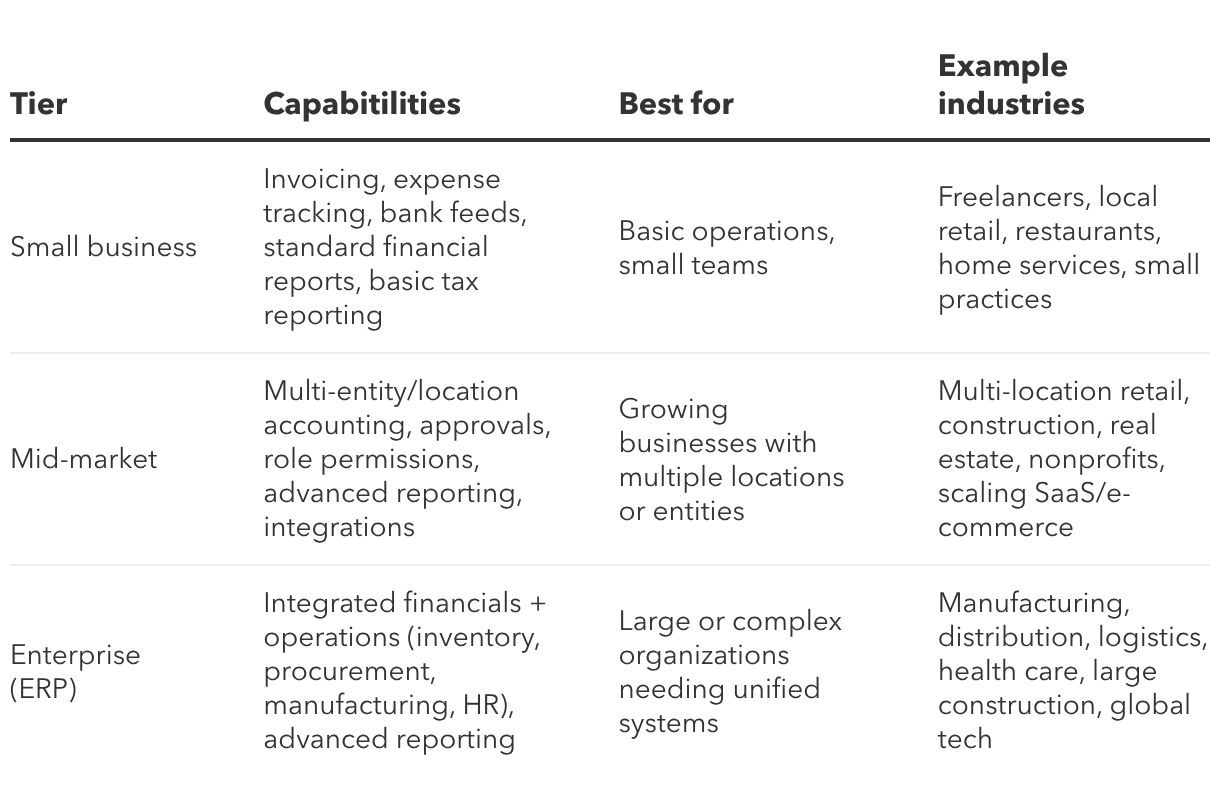
Accounting software tier comparison
As businesses grow, their financial and operational needs evolve. The chart below highlights common accounting software and ERP tiers, what they include and who they’re designed to support.
Common pricing models
Accounting software vendors use different pricing structures. Understanding these models helps you compare apples to apples and spot hidden costs.
Subscription tiers
Most vendors structure their pricing in levels that build on one another. Each level brings additional features, such as multi-currency support, project tracking, and more advanced reporting. Higher tiers also often include more users or higher transaction limits. Choose the subscription tier that matches your current needs, but leave room to scale without jumping to the next tier immediately.
Per-user vs per-company pricing
Some platforms charge per user, and each additional login increases your monthly cost. Others charge a flat rate per company, regardless of user count. If you have a large team, per-company pricing could save you money. If you're a solo operation, per-user pricing may offer a lower entry point.
Add-ons/modules and usage-based fees
Many platforms charge separately for modules like payroll, advanced inventory, multi-entity consolidation, or premium reporting. Usage-based fees, like per-transaction payment processing charges, can also add up. Always ask what's included in the base price and what costs extra.
One-time license vs ongoing costs
Some legacy systems still offer one-time perpetual licenses instead of subscriptions. While the upfront cost is higher, you avoid recurring fees. However, you'll still pay for support, updates, backups, and hosting (if on-premise). Subscriptions bundle these costs into predictable monthly fees, making budgeting easier.
Frequently overlooked cost considerations
Some accounting platforms include robust support in higher‑tier plans, but in many cases, the software sticker price rarely tells the whole story. In addition to the subscription fee, there may be ‘hidden’ costs like paid training, migration, and add-on services. These expenses may catch you off guard, so it pays to budget for them up front.
Setup and migration costs
It takes time and expertise to move from Excel spreadsheets to accounting software. You'll need to clean up data, map your chart of accounts, import customers and vendors, and set opening balances. If you have to hire help, these services can add thousands to your first-year costs.
Training and ongoing support
Basic email support is usually included, but premium support, such as phone access, dedicated account managers, and training sessions, typically costs extra. Budget for training so your team can use the software effectively from day one.
Integrations and connected tools
Your accounting software doesn't work in isolation. Depending on your business or industry, you’ll likely need to connect payroll, payment processors, e-commerce platforms, time tracking, or inventory systems. Some integrations are free; others require paid add-ons or third-party middleware.
Professional help
Accounting software automates a lot, but many businesses still need to hire an accountant for strategic advice or tax preparation. They may also require a bookkeeper for monthly reconciliations, year-end close, or other periodic help. These are valuable ongoing costs that ensure your books stay accurate and compliant.
How much does an accountant cost on top of software?
Many businesses still budget for periodic support from a CPA or tax professional, even when using accounting software. Costs for accountants vary widely based on complexity and location, but fees can range from a few hundred dollars for one-time tax preparation to several thousand dollars per year for ongoing advisory services and financial review.
How to estimate your true annual cost (TCO)
The advertised monthly price of accounting software often doesn't reflect the full amount you'll spend. What you really need to know is your total cost of ownership (TCO). Here's how to calculate it.
What’s the difference between price and total cost of ownership (TCO)?
Price is what you see on the vendor's website. TCO is what you actually pay once you add users, modules, implementation, training, integrations, and ongoing support. TCO gives you a realistic annual budget, not a misleading starting point.
Step 1: List your must-have workflows
Start by figuring out precisely what you need the software to handle. Do you need it for invoicing clients, tracking expenses, or reconciling bank accounts? Maybe you also need features like payroll management, inventory tracking, or advanced tools, such as approval workflows for better control.
The more specific you are about required features and modules, the easier it is to select the optimal level of functionality.
Step 2: Count users by role
Map out who needs access today—owners, accountants, AP/AR staff, managers, or other team members—and define what level of access each role requires. Then look ahead 12 to 24 months. Are you planning to hire additional staff, add locations, or expand into new services?
Even when pricing is tier-based rather than strictly per-user, higher levels often include expanded access and capacity. Factoring in both your current team and projected growth gives you a more accurate view of the total cost of ownership (TCO) and helps prevent unexpected increases as your business scales.
Step 3: Add year-one services
If you're migrating from spreadsheets or another system, budget for implementation, data migration, and training. These are typically one-time costs but often range from 20% to 50% of your first-year spend.
Step 4: Add “connected stack” costs
Account for any add-ons your business relies on, such as payroll, payment processing, e-commerce integrations, time tracking, or enhanced reporting. Some features are included in certain tiers, while others require separate fees. Including these costs in your calculations gives you a more realistic view of your monthly or annual total cost of ownership.
How to keep accounting software costs down without underbuying
You don't want to overpay, but you also don't want to buy a system that's too small for your needs. Here's how to strike the right balance.
Start with your reporting needs
Before you choose a plan, consider the reports you rely on most. Whether it's a simple P&L, a detailed cash flow statement, or job costing breakdowns, your reporting requirements should guide your accounting software decision.
If basic reports give you the clarity you need, there’s no reason to pay for advanced analytics. But if real-time insights will help you make smarter decisions, it’s wise to budget for a more powerful tier.
Limit seats to the roles that truly need access
Since every additional user increases your costs, it’s wise to assign access based on roles. Only give full-priced, full-access seats to team members who truly need them. You can save money by using read-only or limited-access roles wherever possible.
Avoid paying for complexity you don’t have yet
While sophisticated capabilities are valuable, you don’t need to buy multi-entity, advanced inventory, or multi-currency features if you don't need them today. You can always upgrade as your business grows. Focus on your current requirements.
If you’re on spreadsheets today, plan the transition intentionally
Migrating from spreadsheets requires planning. Clean up your data first, map your chart of accounts, and budget time for training. A thoughtful transition helps save you money and headaches.
When paying more for your software is worth it
Sometimes, spending more upfront can be a smart investment. It saves time, minimizes costly errors, and lays a solid foundation for your business to thrive in the long run. While it may seem like a bigger commitment initially, the benefits often far outweigh the costs.
Signs you’ve outgrown entry-level software
Choosing the right accounting software can help your business reach its full potential. If you’re currently using an entry-level software, here are some signs that your business is ready for a more powerful solution:
You rely on workarounds
Are you constantly exporting data to Excel for deeper analysis or manually consolidating reports from different sources? When you have to combine sales data from three separate spreadsheets just to get a monthly overview, it’s a flag that your software isn’t keeping up.
Your processes are becoming more complex
As your business grows, so do your needs. You might find yourself managing multiple business entities, dealing with intricate inventory systems, or handling multi-currency transactions for international sales. If your software can't support this complexity, it's holding you back.
You need stronger security and control
When your business needs detailed audit trails to track changes or more granular user permissions to control who can access and modify financial data, it may be time to move beyond basic accounting software. More advanced systems are built to support stronger oversight and compliance requirements.
Approval workflows are a bottleneck
If getting invoices or expenses approved involves a long chain of emails and manual follow-ups, your current system lacks the automation to support your team efficiently. When these challenges start to consume your time and create inefficiencies, investing in more advanced software becomes a clear path to regaining control and empowering your growth.
If you’re considering enterprise/ERP, expect higher service levels
Enterprise accounting software and ERP systems require significant implementation, training, and support. The higher cost reflects the complexity and the level of service you're buying—dedicated account managers, priority support, and custom configurations.
Explore QuickBooks accounting software
Now that you understand what accounting software truly costs, you can budget with confidence. Here's how to select the right accounting software for your business needs.
- Define your must-have features and workflows
- Count your users and project growth
- Request quotes from 2–3 vendors and ask for the total first-year cost (including implementation)
- Compare TCO, not just monthly subscription prices
Ready to find the right solution? Explore QuickBooks accounting software for small to mid-market businesses. If you're managing multiple entities or need advanced reporting, check out Intuit Enterprise Suite for scalable, powerful financial management.
Recommended for you




Explore what you can do with QuickBooks
Explore what you can do with QuickBooks

See profit at a glance


Get expert help
Looking for something else?
Firm of the Future
Topical articles and news from top pros and Intuit product experts.
QuickBooks Support
Get help with QuickBooks. Find articles, video tutorials, and more.
Call Sales: 1-800-285-4854





© 2026 Intuit Inc. All rights reserved.
Intuit, QuickBooks, QB, TurboTax, Credit Karma, and Mailchimp are registered trademarks of Intuit Inc.
Money movement services are provided by Intuit Payments Inc., licensed as a Money Transmitter by the New York State Department of Financial Services. For details about our money transmission licenses, or for Texas customers with complaints about our service, please click here.
By accessing and using this page you agree to the Website Terms of Service.