
Get 50% OFF QuickBooks for 3 months*

Buy now
Switch to QuickBooks and 70% off for 3 Months
June 10, 2019
Solved

Automatically bill time based on billing rates

  • June 10, 2019
  • 4 replies
  • 2 views

I am recording time using TSheets. I approve the time using QuickBooks after its synchronised with tsheets. Once I’ve approved the time I can create an invoice. At this point the billing rate is zero but it does show me the hours billed. It also posts a cost to the project based on the employee cost rate. Once I’ve pulled the time entry into an invoice I can’t see which employee incurred the time so I’m not sure how much to invoice. I can see a billing rate in the employee list but I can seem to get the information to pass through to the invoice. 


Can i I set billing rates in qb online or is there a way around this issue.
Best answer by Jon Andrews

Hello there, Jon Andrews.


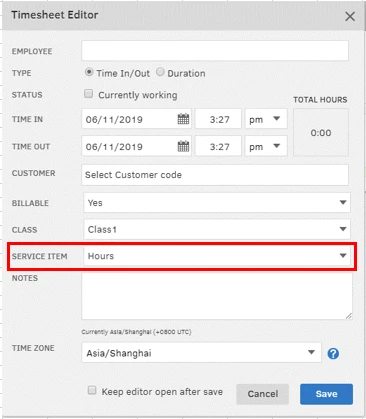
When you create an invoice from TSheets, the rate is based on the Service item you've selected. 


In your case, I'd suggest creating two different service items for employees and apprentices. Then, import it to your TSheets account. This way, you can select the correct service item with the correct rate when editing time entries.


Check this article as your guide on how to create a service item.


Click the Reply button if you have other concerns. I'm here to help.


This will create too many service items and will make things complicated.  


I believe QB desktop can manage this kind of time sheet billing but it sounds like Quickbooks on line can not.


I just found a workaround.  Once I approve the time I go to weekly timesheets.  From here I can adjust the pay rate based on employee at the service code level.  It's a bit slow and "clunky" and would expect software like QB to make it streamline like the rest of the software.


4 replies

QuickBooks Team
June 11, 2019

Let me welcome you first to the Online Community, Jon Andrews.


Thanks for being detailed about your concern. This gives me a clearer picture of what happened.


Once the TSheets data are synced into QBO, the employee’s name will not automatically show on the invoice. You still have to manually enter it in the Description field to identify who incurred the time.  


Ideally, the billing rate should appear when creating an invoice. Since this information is not auto-populating, let’s try performing some troubleshooting steps to fix the issue.


To begin, open the service and make sure the rate is selected. If the item is properly set up, refresh the timesheet data by opening and closing it.


This should help you get back on track. Keep me posted how these steps work for you. I’ll be right here if you need more help.


June 11, 2019

Thanks for your reply


i have qualified and apprentices logging time under the same service item. The qualified employee bills time at a higher rate than the apprentice so I need different billing rates based on employees. In the employee details there is a field for charge rate as well as cost rate (per hour). The cost rate auto populates in project costs but the charge out rate does not auto populate when producing an invoce


AlexV
Level 10
June 11, 2019

Hello there, Jon Andrews.


When you create an invoice from TSheets, the rate is based on the Service item you've selected. 


In your case, I'd suggest creating two different service items for employees and apprentices. Then, import it to your TSheets account. This way, you can select the correct service item with the correct rate when editing time entries.


Check this article as your guide on how to create a service item.


Click the Reply button if you have other concerns. I'm here to help.

March 18, 2020

QBO absolutely needs an option to set bill rates for employees at a project level. We negotiate our bill rates for different classes of employees for each contract.  That bill rate sheet is specific to each contract.  I don't want to setup a bunch of different "service items" in order to accomplish this.

May 12, 2020

I agree.  I use QB online with projects and T-sheets.  All automatically comes into the weekly timesheets except pay rates.  T-Sheets doesn't push that field.  They check the "Billable" box, but I have to manually add the pay rate for each employee time sheet entry field before I can add to an invoice.  What a pain and I only have a few employees.  I've found if I uncheck and recheck the "billable" box, the default rate gets added, so why can't that happen automatically?

Angelyn_T
Moderator
May 12, 2020

Thank you for joining the thread, @ohanavet.


At this time, I encourage checking with TSheets as the timesheet seems to be billable but the feature is not carrying the command. This way, they'll be able to review and investigate the cause of this behaviour.


As always, feel read our help articles just in case you need tips and related links while working with QuickBooks in the future.


Post again if there's anything you need assistance with. I'm a post away to help. Have a good day!

July 23, 2020

Does QB online advanced or any other version of QB handle bill rates.  We are a simple consulting company and just want to be able to send out invoices based on the bill rate of the project.

April 10, 2021

We have the same fundamental problem.  It is not feasible to have a service item for every possible bill rate we charge customers, or to expect employees to know which item to use for their role on each project.  With the forced transition to TSheets we're in the position of needing to go in and manually edit weekly time sheets in QuickBooks after time is approved/synced from TSheets.  This is an error prone and unreasonable solution.


Pricing rules do not work for us as they cannot be set based on class (we do not use projects).  Expanding the capabilities of price rules would solve most of the problems for me and many of the other QBO customers with the same issue.  In our case, we need price rules created based these criteria:


1) Class

2) Employee

3) Service Item


In other words, set rate to $150/hr for Class "XYZ" AND Employee "John Doe" AND Service Item "Consulting"


Overtime will still be a problem.

QuickBooks Team
April 10, 2021

Thank you for joining the thread, @RyanBe.


I understand the importance of being able to configure the billable rates by employees in addition to the rates by service item in QuickBooks Online. I'll also pass along this to our engineers so they'll get more ideas on how to improve QuickBooks and ensure to give our customers the best experience possible. 


To stay current with the latest news and updates, you can always visit our blog.


Leave a comment below if you have any other questions. I'm a few clicks away to help. Have a good day!

April 26, 2022

Still no change as of April 26, 2022. Is adding the billing rate automatically even in the planning stage?