Hello there, @david224. I'm here to help you in refunding your customer's credit card payment.
You can use refund receipts if a customer asks for a refund for an item or service.
Here's how to refund a credit card payment for a sales receipt:
- Click + New, then Refund receipt.
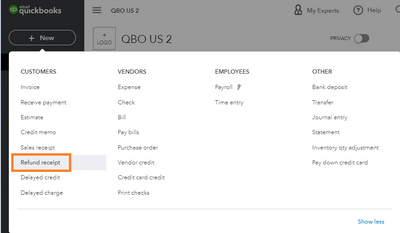
- Select the customer you want to refund from the Customer dropdown.
- Enter the details in the fields using the same info from the original sale. To credit back their credit card, in Payment method, select Credit card. To credit back their bank account, in Payment method, select Bank.
- In Refund from, select which payment method and account you wish to refund the customer from.
- Select Save and close.
If it's a paid invoice you need to refund, follow these steps:
- Click + New, then Refund receipt.
- Select the customer you want to refund from the Customer dropdown.
- Enter the details in the fields using the info from the original sale.
- Choose which payment method and account you wish to refund the customer from.
- Select Save and close.
You can visit again this link for more details about the process: Void or refund customer payments in QuickBooks Online.
Moreover, with refunds or return transactions, you may incur a fee depending on your pricing plan and transaction type. For further details, check out this article: Understand fees for refunds or void transactions.
Fill me in should you need further assistance with this refund process. The Community team will always here to help. Have a great day ahead!
