
Get 50% OFF QuickBooks for 3 months*

Buy now
Switch to QuickBooks and 70% off for 3 Months
August 18, 2021
Solved

Workforce

  • August 18, 2021
  • 2 replies
  • 1 view

I don't want Workforce available to my employees.  

I've entered all their e-mail addresses in their employee files and don't want to delete them.

Is there a way to opt out of Workforce as the employer?

 

Best answer by MaryLandT

Let me help you turn of Workforce so employees can't access their paychecks and W-2s online, HawkUtah.


You can start by having the latest maintenance release and the latest payroll updates. It helps pull up the Manage Payroll Cloud Services option where you can change the status.


Once done, here are the steps you can follow:
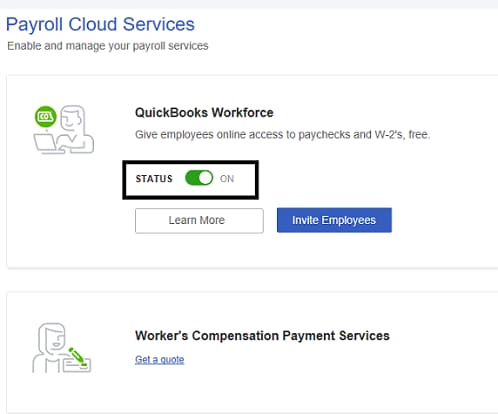
 

  1. In your QuickBooks Desktop company, select Employees, then Manage Payroll Cloud Services.
  2. If you don't see the Manage Payroll Cloud Services option, you don't have the latest QuickBooks Desktop release or the latest payroll updates.
  3. In the Payroll Cloud Services window, under QuickBooks Workforce toggle the status to OFF.
    QBWF
  4. Follow onscreen instructions to complete the process.
     

In case you change your mind and want them to access their paychecks and W-2's online, you can invite them again. Check out this link for instructions and detailed steps: Invite your employees to QuickBooks Workforce.


For future help, here are some articles to help you get ready during tax season: 

Let me know if there's anything else I can do to help you with concerning payroll. I'm here to lend a hand. Take care and have a great day.

2 replies

MaryLandT
MaryLandTAnswer
Level 10
August 18, 2021

Let me help you turn of Workforce so employees can't access their paychecks and W-2s online, HawkUtah.


You can start by having the latest maintenance release and the latest payroll updates. It helps pull up the Manage Payroll Cloud Services option where you can change the status.


Once done, here are the steps you can follow:


  1. In your QuickBooks Desktop company, select Employees, then Manage Payroll Cloud Services.
  2. If you don't see the Manage Payroll Cloud Services option, you don't have the latest QuickBooks Desktop release or the latest payroll updates.
  3. In the Payroll Cloud Services window, under QuickBooks Workforce toggle the status to OFF.
    QBWF
  4. Follow onscreen instructions to complete the process.
     

In case you change your mind and want them to access their paychecks and W-2's online, you can invite them again. Check out this link for instructions and detailed steps: Invite your employees to QuickBooks Workforce.


For future help, here are some articles to help you get ready during tax season: 

Let me know if there's anything else I can do to help you with concerning payroll. I'm here to lend a hand. Take care and have a great day.

June 30, 2025

how do access work force ? please call me [PII Removed]

QuickBooks Team
June 30, 2025

To access QuickBooks Workforce, you'll need an invitation from your employer, Tim.


After your employer sends the invitation, you'll receive an email from do_not_reply@intuit.com with their name in the subject line and a link to set up your account. Then, create a new account or log in with an existing Intuit Account. If you don't see the email, check your spam folder or confirm your email address with your employer. Click Accept Invite to proceed.


After accepting the invitation, go to workforce.intuit.com or the QuickBooks Workforce mobile app to finish the setup of your account for payroll and/or time tracking.


Once set up, you can update your information (if enabled by your employer), opt out of receiving a mailed copy of your W-2, and access your pay stubs and W-2s online. For more information, refer to this guide: Invite your employees to see pay stubs, W-2s, and more.


Ensure you have the latest version of the QuickBooks app and that your device's operating system is up to date.


If you're looking forward to talking to our live support team, follow these steps to contact them:


  1. Click the Help menu.
  2. Select QuickBooks Desktop Help/Contact Us.
  3. Enter a brief description of your concern, and select Continue.
  4. Sign in to your Intuit Account, and select Continue.
  5. Select Chat with us or Have us call you.


Our live support team is available Monday to Friday, 6 AM–6 PM PT for Plus (Mac, Pro, Premier) users and 24/7 for Enterprise users.


For help with forgotten usernames, passwords, or updating account information, here are some useful resources: 


If you need further assistance managing your employee's status or have any other questions about QuickBooks, feel free to reach out. We are here to help!

June 30, 2025

Hello I am the employer my book keeper quit and I am trying to log into QuickBooks work force so I can distribute pay check stubs so after I process payroll I click the link and complete payroll and send to workforce and I don’t see any check stubs being sent out ??
