
Get 50% OFF QuickBooks for 3 months*

Buy now
Switch to QuickBooks and 70% off for 3 Months
May 21, 2020
Solved

Is anyone else having issues contacting Intuit? I've tried to use the chat feature for the last couple of days... but it doesn't appear to be working?

  • May 21, 2020
  • 16 replies
  • 9 views
No text available
Best answer by JessT

Hi Brian!


I'll help you on questions 5 and 6 since Mirriam is already out of the office.


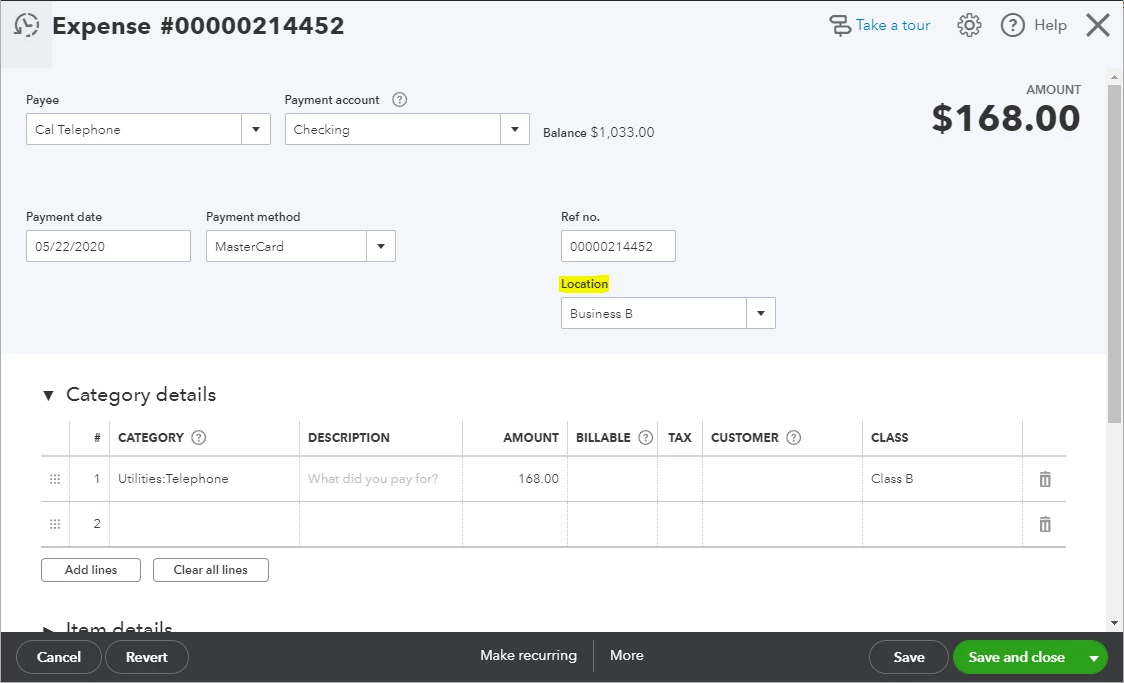
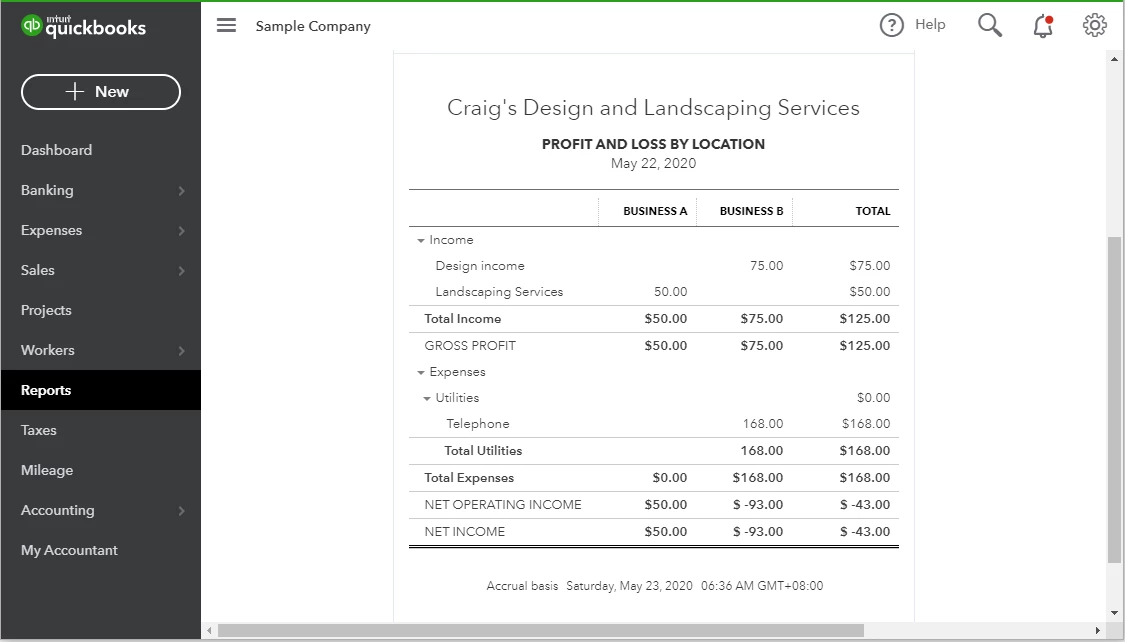
Good news because QuickBooks has a Location tracking feature that lets you tag locations in your transactions. Then, you can run the Profit and Loss by Location report to see your net profit per company. You can try this using the QuickBooks Online Test Drive account.


To enable the feature:

  1. Click on the Gear icon and choose Accounts and Settings.
  2. Click the Advanced bar and click on the Categories section. 
  3. Put a checkmark in the Track Locations checkbox and choose a label.
  4. Click Save and Done.

To add a list of location names:

  1. Click the Gear icon and choose All lists under LISTS.
  2. Select Locations.
  3. Click the New button and enter the information of the first location.
  4. Click Save, and create a new one for the other business.

After enabling this feature, you will see a Location field on the transaction pages, where you will choose the names you create. Please refer to the screenshots below. You can click on them for a better view.


I've noticed that you have a few questions posted here. We appreciate it that you're utilizing this medium to get help with QuickBooks. You can also run through the QuickBooks Online articles if you need quick references in the future.


Let us know if you have additional questions about the feature. Have a great weekend, Brian!

16 replies

Level 3
May 21, 2020

I know there have been some issues with the chat feature. 

I have NEVER had luck with it.  If you really need to contact someone at Intuit, you should maybe request a callback. It's quicker.  I requested 2 chats, back in January.  I'm still waiting.  Lol


You can always ask your questions here, in the forum, and see if anyone might be able to help.  


Good luck.  

QuickBooks Team
May 21, 2020

I'd love to help you with your issue about QuickBooks Online (QBO), @pam-redsbarber.


May I know what specific help you need? I can answer some general questions or concerns you may have about QBO. Simply click the Reply button below, and I’ll do what everything in my power to assist.


However, if you still wish to contact our Customer Care support, it's possible that the chat business hours are off when you tried contacting us. You can check our Support hours and types article for guidance.


Moreover, I don’t want to leave you empty-handed, you'll want to visit our Community Help Articles hub in case you need some related articles in managing your account.


As always please let me know how this goes or check back if you need help with QBO. Have an awesome day!


**Say "Thanks" by clicking the thumb icon in a post.
**Mark the post that answers your question by clicking on "Accept as solution".

BC-MDAuthor
May 22, 2020

Hi Mirriam,

I’ve posted the first four of my questions in separate posts….it would be great if you could help with questions #5 & #6


1 – Subsequent A/P and A/R transactions after year-end/audit period.  Need to list the details (ck#, ck date) of A/P outstanding as of year-end paid after and provide the details of cash received (i.e. ck#, deposit date) after year-end of A/R outstanding at year-end.

2 – An Qkbks Desktop Customer lost / forgot their admin password (I want them to start closing the year… once we complete the audit.. the TB from last year… which Tied to the audit report has changed and they have no idea what has changed.  As you can imagine.. is a problem)

3 – New online customers not showing up under firm (they are already QkBks online customers that will continue to pay Intuit directly)… I can see them.. but no one else at our firm.

4 – I’m new and interested in training (CPE credits) for QkBks.  Want to know what’s recommended / appropriate

5-Can I use the location function like a class (client already uses classes for other purposes).  Basically I want to use location to capture costs between two sister companies.  Most of the cost / activity will go thru one of the sister companies.  I will manually consolidate the sister companies via excel for now… but I want to easily tease out / identify the transactions in the P&L reports that belong to the sister company.

6-Is there a test company I have access to play around in.. to see how functionality works, post transactions etc… It would be nice to test certain things before doing in a client’s data base


Thanks in advance,

Brian

June 18, 2020

I have clocked over 15 hours with 5 Advisors within my first 12 days of owning QB Enterprise. I have been old to instruct Microsoft to uninstall and reinstall Windows. I never had trouble with Windows before, my PC is working well, and nothing is out of order except Enterprise. Prior Accountant Pro worked fine.  Transfer/installation of 3 big files 6/5/2020: Pro Accountant 2016 data, and 2018 data, and 2020 data. Reference no. [removed]. Please let me send an email. I never was given Priority Circle privileges or informed how to apply when I asked.  Before I purchased the Enterprise, I was directed to a more specialized technical support . I was anticipating a problem of this scope and he was very helpful. Can this matter be escalated?

June 18, 2020

I'm very unhappy because I can't get any attention for my difficult problem. I have working with 5 advisors for 15 hours since my install 12 days ago. Don't these nice young people have administrators to guide them? One said he had 8 weeks of training which good. I would be happy to pursue other pathways. I find chat helpful.

Moderator
June 18, 2020

This is not the kind of service we want you to experience in QuickBooks, @schultz2020. But, I assure you there is full of experts who are knowledgeable in all aspects of QuickBooks, and we're always pleased to help you along your way to success. You may find our Pro-Advisor available within your specified location. Here's how to search a Pro-Advisor:  


  1. Go to Find-a-ProAdvisor website.
  2. Click Get Started.
  3. In the Find a pro window, tell us what you need to help with?, then click Next.
  4. Choose the industry or type of business you have, then click Next.
  5. Select the specific QuickBooks version you're using for your business, the click Next.
  6. Enter the specific location or address of the accountant.
  7. Click Search


That should do it! You'll then see a list of accountants available within your specified location.  


As always, you can reach out also to our Customer Support team, for further assistance. As they have the tools to pull up your account in a secure environment and answering any questions you may have.  


You can always visit us here in the Community if you have other questions about the Find a Pro-Advisor Program. Have a great day!

July 1, 2020

I also am having troubles.  The chat feature generates no response 

Adrian_A
Level 8
July 1, 2020

Our Chat Support team has a specific business time, aa11236.


You may have contacted them after their office hours. This can be the reason why you didn't get any response from them.


Our Chat support team is available every Monday to Friday from 6:00 AM to 6:00 PM PST. Then, every Saturday between 6:00 AM to 3:00 PM PST.


If you're using the QuickBooks Online Advanced version, you may contact them any time and any day. 


Here's an article that has the list of our contact support: Support hours and types.


Tag my name if you need some assistance. I'll be happy to help you. Take care!

August 11, 2020

I'm contacting the online chat within the hours listed and still nothing - NEED a call back feature

August 11, 2020

I can't access online chat feature - I fill out form and then the page goes blank.  How do we get help with online payroll if we can't chat with anyone?

September 5, 2020

Another screenshot of my frustration.

TheresaC
September 5, 2020

Hello John, 


We appreciate the time you've spent in reaching out to us.


We want to make it up to you by making sure you get the help you need with your account concern. 


You'll hear from us soon.

September 30, 2020


It's been over a month since you wrote, "you'll hear from us soon," but no one has contacted me.


Meanwhile, another monthly payment has been extracted from me without me having accessed or used my QB account.


What are you going to do to help me?


John

December 26, 2020

Can someone help me? I'm trying to learn how to buy the online version as I want to convert from the Desktop Accountant 2016. I've lost my 4 company files, for some reason the back ups don't exist so I found backups from a year ago and want to start here but afraid I will lose my company files again. Can someone helps me with this issue and walk me through converting from Desktop to online?

thank you,

roberta 

Pabz_L
December 26, 2020

Hello there, @Friends Properties.


 If you want to purchase QuickBooks Online (QBO), I recommend contacting our support team. They have the proper tools to place an order or subscription depending on what version suits your company and the core features that will help you run your business. 


Once you already have the online version, you can use this article for the steps on how to convert your company file from QuickBooks Desktop to Online: Move your QuickBooks Desktop file to QuickBooks Online.


To ensure that your books match, you can run one of your financial reports in QuickBooks Desktop and Online to check if your import is successful.


I’ve added some article that will help you get started with QuickBooks Online:


Please let me know how this goes or check back if you need help with QBO. Have a great day!


December 30, 2020

No one to talk to - have to Chat - get the runaround - sent to a Chat site that doesn't work.  Trying to sell me a new version.  

Moderator
December 30, 2020

I'd also feel upset when I'm ain't getting the right help, @Kafa.


I want to make it up to you by making sure you can contact our support team. Before diving in, let's get the chat site working again. I know the steps on how to achieve this.


First, let's use a private browser when accessing the chat site. Private mode prevents storing cache that can cause problems when running websites. Thus, a good place to fix unexpected issues like this.


Below are the shortcut keys you can use to access one:


  • Ctrl+ Shift + N for Google Chrome .
  • Ctrl + Shift + P for Mozilla Firefox  and Microsoft Edge .
  • Command + Shift + N for Safari .

After that, you can go to your QBO account's Help menu to connect with them. 


Please note that our agents are available Mondays to Fridays 6 AM to 6 PM PT and Saturday 6 AM to 3 PM PT (for Plus, Essentials, and Simple Start users). If you're a QuickBooks Online (QBO) Advanced user, you can contact them anytime on any day.  


For the new Help menu interface:


  1. Click the (?) Help icon at the top.
  2. Select the Talk to a human option, and then type it again when prompted.
  3. Choose I still need a human, and then proceed with Contact us.
  4. When asked by the bot, enter your question or concern.
  5. Click Let’s talk.
  6. Select either the Get a call or Start messaging option.
  7. Please follow the on-screen steps to continue.

For the old Help menu, you can refer to this article as your guide: Contact QuickBooks Online support. You can also use our test drive to access the Help menu.


If it works fine this time, please go back to your original browser and clear its cache. This way, the system will start a clean slate. Otherwise, you can use another supported web engine instead. 


Alternatively, you can post your questions or concerns here in the Community. One of our experts or users can share some insights and best practices you might find handy.


Meanwhile, you can visit our general support page for more QuickBooks tips.


I'll keep this post open in case you have some follow-up questions. I'm here to help you.

December 30, 2020

I have used Intuit for years and EVERYTIME I have a hard time contacting Intuit for assistance with my account.

January 19, 2021

WOW!  I'm still trying to contact ANY payroll support at Intuit.  Nothing works.  No phone number, chat doesn't respond. I'm lost to what to do.  HELP!

Moderator
January 19, 2021

Help has arrived, @EATaxPro.


I appreciate your effort, and I know you’ve been through a lot while trying to connect with Payroll Support. Can you share your concern with me so I can provide the best resolution?


QuickBooks has a new contact feature so customers can reach out anytime while continuing their tasks within the program. You can follow the recommended steps mentioned by my peer @ReyJohn_D since we’re unable to provide you our support contact information.


Due to the high volume of calls, there are customers unable to request an immediate callback and messaging. Rest assured that we’re doing our best to cater who are in need of assistance. I recommend contacting them around 6:00 AM-6:00 PM PT from Monday to Friday.


I have included a list of payroll reports here. This way, you can keep track of your payroll entries by making sure details are all accurate. You can also customize them to focus on the specific information you need.


Don't hold back to drop a comment below if you have payroll questions. It's my pleasure to be of great help. Take care!
